Audio Capture Pro ActiveX Control
... powerful audio capturing solution! Introducing the remarkable "Audio Capture Pro ActiveX Control" developed by the renowned Viscom Software. This exceptional software empowers you to effortlessly capture ...

VideoCap Pro Video Capture ActiveX SDK by Viscom Software is a powerful tool designed for developers looking to integrate video capture capabilities into their applications. This SDK supports a wide range of video sources, including webcams and capture cards, and offers features like real-time video preview, frame grabbing, and video encoding. Its user-friendly API simplifies the implementation process, making it suitable for both novice and experienced developers. With robust performance and fl ...
| Author: | Viscom Software |
| License: | Demo |
| Price: | $199.00 |
| Released: | Dec 13, 2025 |
| File size: | 65.40 MB |
| Downloads: | 12 |
| Keywords: | ActiveX, screen recording, video capture, ActiveX SDK, VideoCap Pro Video Capture ActiveX SDK, multimedia development, capture, tuner preview, VideoCap Pro Video Capture ActiveX SDK free download, Viscom Software, snapshot, capture from tv tuner, webcam |
| Author URL: | https://www.viscomsoft.com |

VideoCap Pro Video Capture ActiveX SDK, developed by Viscom Software, is a comprehensive software development kit designed to facilitate video capture and processing functionalities within Windows applications. This SDK is particularly suited for developers looking to integrate advanced video capture capabilities into their software solutions with ease and efficiency.
At its core, VideoCap Pro provides robust support for capturing video from a wide array of sources, including digital cameras, webcams, and capture cards. It is compatible with a variety of video formats, ensuring flexibility and adaptability to different project requirements. The SDK supports real-time video capture, allowing developers to implement features such as live streaming and video conferencing in their applications.
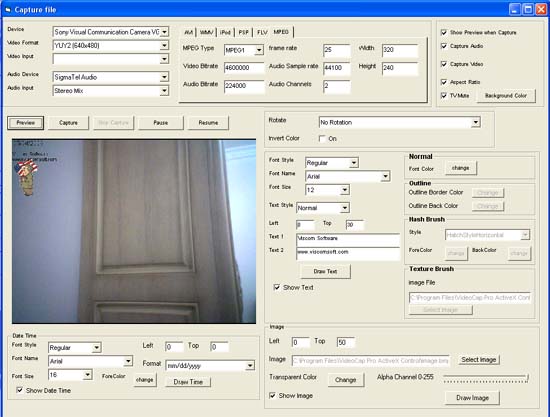
One of the standout features of VideoCap Pro is its ability to handle multiple video capture devices simultaneously. This capability is particularly beneficial for applications that require input from multiple video sources, such as surveillance systems or multi-camera setups. The SDK also offers advanced video processing features, including video preview, recording, and playback functionalities, which can be seamlessly integrated into custom applications.
VideoCap Pro is designed with ease of use in mind, offering a straightforward integration process for developers. It provides a rich set of ActiveX controls, which can be easily embedded into applications built with popular development environments like Visual Studio. This ensures that developers can quickly implement video capture features without extensive coding or technical expertise.
In addition to its core functionalities, the SDK offers a range of customization options, enabling developers to tailor the video capture experience to their specific needs. This includes support for adjusting video parameters such as brightness, contrast, and frame rate, as well as the ability to overlay text and graphics onto video streams.
The SDK also includes comprehensive documentation and sample code, which serve as valuable resources for developers during the integration process. This support ensures that even those new to video capture development can effectively utilize the SDK’s capabilities.
Overall, VideoCap Pro Video Capture ActiveX SDK by Viscom Software is a powerful and versatile tool for developers seeking to incorporate sophisticated video capture functionalities into their Windows applications. Its combination of ease of use, extensive feature set, and support for multiple video sources makes it a compelling choice for a wide range of video capture applications.