ESET SysInspector (32 bit)
ESET SysInspector is a free diagnostic utility for examining a ... repair or remove the reported items. The report covers running processes and services, installed drivers, files, registry entries and ...

ESET SysInspector is a free diagnostic utility that gathers detailed information about a Windows computer to help investigate malware concerns and system problems. Its report covers running processes and services, drivers, files, software, hardware, registry entries, and network connections. Color-coded risk levels and a severity filter help focus review, while Compare Logs makes it easier to identify changes between saved reports.
| Author: | Eset |
| License: | Freeware |
| Price: | FREE |
| Released: | Jun 24, 2020 |
| File size: | 7.50 MB |
| Downloads: | 475 |
| Keywords: | system log comparison, Eset developed, SysInspector x64, in-depth system analysis, ESET SysInspector, process and services viewer, ESET, diagnostic x64, 64-bit software, system diagnostic tool, x64, system issues, system information x64, registry x64, driver issue diagnostics, running processes, sysInfo, computer troubleshooting, Windows 10 compatible, malware investigation tool, drivers list |
| Author URL: | https://www.eset.com/ |


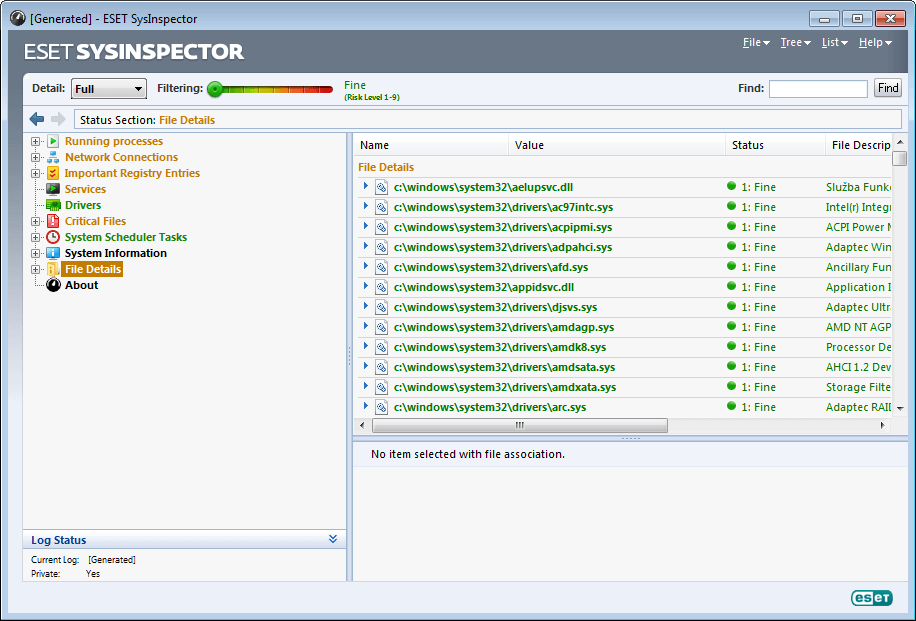

ESET SysInspector is a free system diagnostic utility for users and support technicians investigating unusual computer behavior, possible malware, or configuration problems. It collects detailed information about a Windows computer in a report, bringing together system components that would otherwise need to be checked separately. The tool is intended for inspection and troubleshooting rather than as a replacement for antivirus software or a repair utility.
The report covers running processes and services, drivers, files, software, hardware, registry entries, and network connections. This broad view helps narrow down where to investigate when a program behaves unexpectedly, a device does not work correctly, or system performance changes. Information about unsigned or suspicious files and connections can also help flag items for closer review, though a finding should be assessed in context rather than treated as proof of infection.
Each entry receives a color-coded risk level. A slider lets the user filter the report to focus on more severe items, which is useful when a scan returns a large amount of detail. This prioritization helps make comparisons and manual review more manageable, especially when an administrator or technician is examining a computer with many processes, services, and drivers.
SysInspector can save diagnostic logs, and its Compare Logs function highlights changes between reports. Keeping an earlier log provides a reference for spotting newly introduced files, services, or other system modifications after a software installation, update, or suspected incident. The reports can support troubleshooting and provide information to share with technical support, but interpreting the results still requires judgment; the utility does not automatically resolve the problems it identifies.
The standalone application is freeware and is also integrated into ESET endpoint products. This 64-bit edition is intended for Windows systems, including Windows 10 and Windows 11, as well as several earlier Windows releases. It is suited to users who need a detailed system snapshot for investigating possible malicious code, driver issues, software conflicts, hardware compatibility, outdated operating-system components, broken registry entries, or suspicious network activity.