Game Fire
Welcome to the ultimate destination for downloading Game Fire, a revolutionary software developed by Smart PC Utilities, Ltd. This Windows 10 compatible software is designed to supercharge your gaming experience. ...

Game Maker Lite is a Windows game-making environment for beginners and hobbyists. It combines a drag-and-drop interface with an integrated development environment and GameMaker Language (GML), allowing creators to build gameplay visually or add code for more control. Projects can include sprites, sounds, backgrounds, objects, rooms, scripts, paths and timelines. The freeware edition supports prototyping and creating games for Windows.
| Author: | YoYo Games Ltd. |
| License: | Freeware |
| Price: | FREE |
| Released: | Jul 25, 2023 |
| File size: | 111.00 MB |
| Downloads: | 484 |
| Keywords: | game, game maker lite, Game Maker, game creation tool, Game development, make windows games, Windows 10 compatible, produce games, Game Maker Lite, game development software, build games, produce, YoYo Games Ltd, build, x64 software, gml game development, Interactive design tool, drag and drop game maker |
| Author URL: | https://gamemaker.io/en |
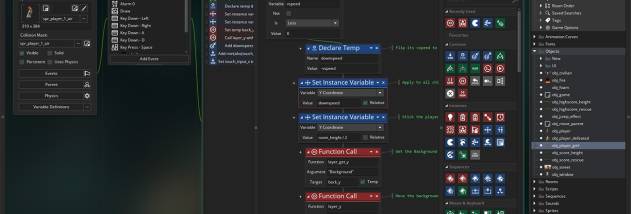



Game Maker Lite is a Windows game-creation environment for beginners and hobbyists who want to build games without starting with a programming background. It combines a visual drag-and-drop editor with an integrated development environment and GameMaker Language (GML), so projects can be made through predefined actions or extended with code. The visual approach helps users assemble basic gameplay, while scripting provides more control over how a game behaves.
Projects are organized into resource types that represent the parts of a game. Sprites provide graphics for characters and objects, while sounds and backgrounds add audio and scenery. Objects define interactive elements and their behavior; rooms provide the spaces in which those elements appear. Paths, scripts, timelines and data files offer additional ways to organize movement, logic and content. Game information and options let creators configure project details.
The workflow supports both visual design and iterative testing. Users can add resources, arrange them into rooms, and assign drag-and-drop actions to objects to create interactions. Those who need behaviors beyond the available actions can write GML scripts and combine them with the visual tools. Keeping graphics, audio, objects and rooms as separate project resources makes it easier to revise one part of a game without rebuilding the whole project.
This setup is suited to learning game-development concepts, prototyping gameplay ideas and making small Windows games. Beginners can start with visual actions and gradually explore code, while more experienced users can use GML for finer control. The range of resource types also supports projects that need custom graphics, sound, timed events or structured game logic.
Game Maker Lite is freeware and runs on Windows, including Windows 10 and Windows 11. It is the Lite edition of Game Maker for Windows, a tool built around a drag-and-drop interface, an integrated development environment and the optional use of GML. Its focus is on creating games for Microsoft Windows; the program does not require users to know how to program before beginning a project.