Gom Player 2.3.5.5258 review by banty warjri (Jul 24, 2016)

The Most User Friendly App....

GOM Player is a Windows media player for watching videos and listening to audio. It uses its own codecs for supported media and includes standard play, pause, stop, replay and fast-forward controls. Users can add or adjust subtitles, change aspect ratio and window size, customize the interface with skins, and play 360-degree video. Hotkeys provide keyboard control, while a right-click menu gives access to playback and appearance options.
| Author: | GOM & Company |
| License: | Adware |
| Price: | $11.00 |
| Released: | Oct 13, 2026 |
| File size: | 214.00 MB |
| Downloads: | 13894 |
| Keywords: | media player software, video player, player, free wmv player, free rmvb player, rm player, mkv player, GomPlayer, 3gp player, Gom Player, video playback optimization, rmvb player, GOM & Company, rmvb codec, avi player, vob player, mpg player, player with codec support, media player with subtitles, mp4, audio and video player, free mkv player, wmv codec, wmv player, Windows 10 compatible, x64 application, gom player, 360 degree video player |
| Author URL: | https://www.gomlab.com/en/gommix-video-editor |


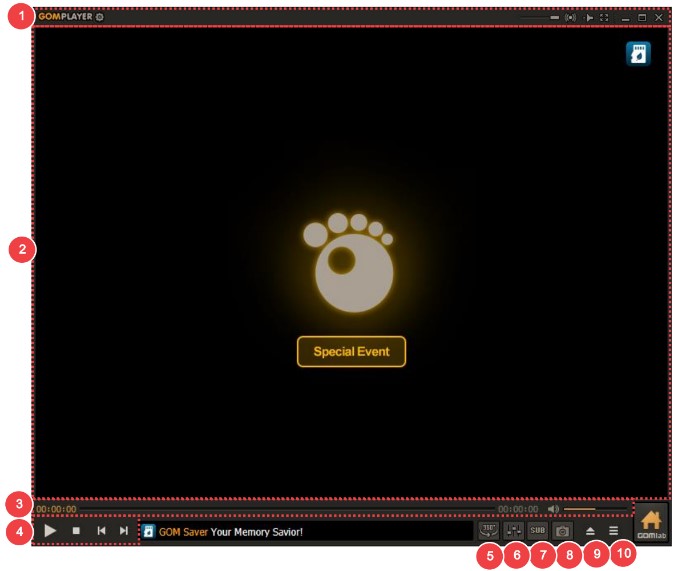

GOM Player is a desktop media player for watching videos and listening to audio on Windows. It is suited to people who want playback controls, subtitle options and display adjustments in one application, with settings that can be kept simple for everyday viewing or changed to suit a preferred setup. The player uses its own codecs to handle media playback, reducing the need to find and install codecs separately for supported content.
Standard controls let users play, pause, stop, replay and fast-forward through a file. Subtitle controls can be used to add subtitles or adjust subtitles already being displayed, helping viewers match text to the video. Display settings include changes to aspect ratio and window size, so playback can be fitted to the screen or viewing layout. GOM Player also supports 360-degree video, providing controls for viewing immersive footage rather than only a fixed camera angle.
The interface includes a right-click menu for reaching playback and appearance options without navigating away from the video. Users can change skins to alter the player's look, while preferences provide additional adjustments. Hotkeys offer another way to operate playback and commonly used functions from the keyboard, which can be useful when the player is running full-screen or placed away from the mouse. The combination of direct controls and configurable options makes it practical for both casual playback and more tailored viewing habits.
GOM Player can be used for movie and video playback, subtitle-based viewing and listening to audio files. Its aspect-ratio and window controls help accommodate different video dimensions, while skin choices let users personalize the interface. The player's own codec support is intended to make opening compatible media straightforward; playback still depends on the formats and files supported by the installed application.
The program is ad-supported software and is available for 64-bit Windows 10 and Windows 11. Its features are centered on local media playback, subtitles, display configuration and 360-degree video rather than video editing or media library management. Users who want a configurable player with keyboard controls and appearance options can keep those preferences alongside the usual play and seek functions.
The Most User Friendly App....