GSA Content Generator
Welcome to your one-stop destination for the GSA Content Generator, a revolutionary software developed by GSA for ... powerful tool is designed to create unique, high-quality content with the click of a button. It's a ...

Inspyder OrFind audits a website's stored files to find items that are no longer linked from its pages. It crawls the site from a root URL, compares discovered links with local or server files, and separates accessible files from orphaned ones. Users can connect through FTP, FTPS or SFTP, review flagged files, back up and remove selected items, schedule checks, receive emailed results, and export reports as PDF, Excel or CSV.
| Author: | Inspyder Software Inc. |
| License: | Demo |
| Price: | $49.95 |
| Released: | Jun 6, 2018 |
| File size: | 14.50 MB |
| Downloads: | 244 |
| Keywords: | Inspyder Software Inc., web crawler, find orphaned website files, website file cleanup tool, content, ftp website file scanner, site optimization tool, x64 compatible software, website cleanup reports, content cleaner, unused files identification, cleaner, broken link file audit, scheduled website audit, schedule, scheduled operation, website content analysis, Inspyder OrFind, broken link detection |
| Author URL: | http://www.inspyder.com |
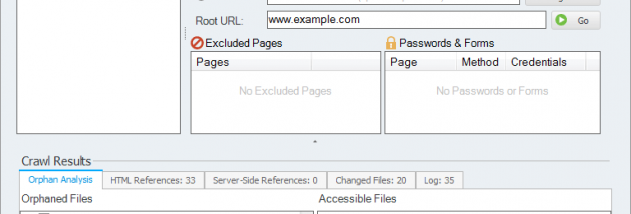

Inspyder OrFind is a desktop website-maintenance tool for finding files on a site that are no longer linked from its pages. It crawls the website from a specified root URL, checks the links it discovers, and compares the results with the files in the site's storage. This gives administrators and site owners a way to distinguish files that appear to be in use from orphaned files that may be candidates for cleanup.
OrFind can scan files on a local computer or connect to a web server through its integrated FTP client. Server connections support FTP, FTPS and SFTP. To begin a check, the user points the program to the website's files and enters the root URL; OrFind then follows links and compares the crawl with the available file set. The comparison is useful for locating leftovers from older pages, redesigns or content changes that are difficult to identify by browsing the site manually.
After a scan, results show accessible files separately from files that were not found through the site's links. Users can choose which orphaned files to back up and remove, rather than deleting every flagged item automatically. Reviewing the results before cleanup helps avoid removing files that are referenced outside the crawl, such as assets used by external systems or pages that were not reached during the check. The backup option provides an additional safeguard when removing selected server files.
For recurring maintenance, OrFind can be scheduled to run daily, weekly or monthly and email its results. This can help teams monitor a site over time and identify newly unlinked files without repeating the setup manually. Scan results can also be exported as PDF, Excel or CSV reports, making it easier to archive findings, review them in a spreadsheet or share a cleanup list with colleagues.
OrFind is intended for website owners and administrators who need to audit stored site files and manage cleanup through local storage or a supported server connection. It is a demo product, and its stated operating-system support covers Windows XP, Vista, 7 and 8; Windows 10 and 11 compatibility is not established here. As with any automated link audit, the findings should be checked before files are removed, since a crawl can only identify links it can access and follow.