KompoZer for Windows 10 - Full description
KompoZer is an open-source, visual HTML editor for creating and maintaining web pages. Its WYSIWYG workspace lets users arrange and format page content without writing every line of markup by hand, while its source view provides direct access to the HTML for people who want more control. The editor suits beginners building simple sites as well as experienced users who need a desktop tool for editing existing pages and styles.
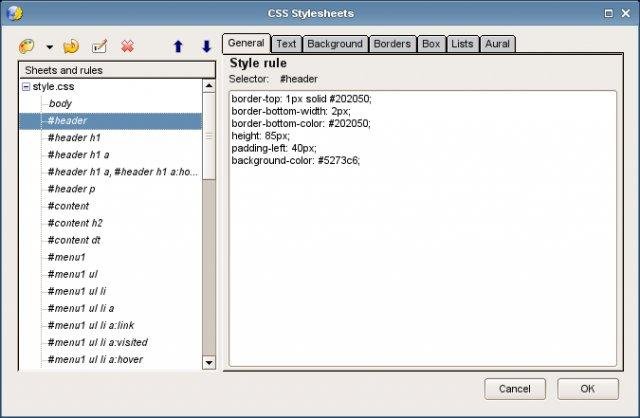
The interface supports switching between visual editing and HTML source through tabs, so changes can be made in the mode that best fits the task. Its CSS capabilities help manage page presentation, while tools for tables, forms and templates cover common site elements. A built-in color picker lets users select colors using RGB or hue, saturation and brightness values, or by choosing a color visually. These features are useful for shaping page layouts and styling without relying on a separate design application.
KompoZer also includes a site manager for browsing files on a web server over FTP. Configured sites appear in a sidebar, where users can navigate folders, filter the display to show HTML documents or images, and view file sizes and modification dates. Pages can be opened and edited from the remote site, supporting a workflow that combines content changes with file management. Multiple documents can remain open in tabs, each with its own undo and redo history, and tab indicators help identify pages with unsaved edits.
The editor can be used to create new pages, revise existing site content, adjust CSS, and make updates to remote files. Visual editing lowers the barrier for users unfamiliar with HTML, while source editing gives web authors a way to inspect and adjust generated code directly. Its combination of page design, code access and FTP browsing makes it suited to small websites and routine maintenance tasks.
KompoZer is open-source software for Windows, with support listed through Windows 10. It is a standalone desktop application based on the Gecko layout engine. Users working with newer Windows releases should check whether the available build runs correctly in their environment. Web publishing requires the relevant FTP connection details, and the editor does not replace the need to verify pages in browsers or test site behavior after changes.