PolyMC
Discover the world of modded Minecraft with PolyMC, the innovative launcher crafted by the ... PolyMC offers a seamless experience in managing multiple Minecraft instances, ensuring you can easily switch between different ...

Prism Launcher is an open-source Minecraft launcher for organizing and starting multiple independent game setups. Create instances for different Minecraft versions, mods, modpacks or play styles, then manage their settings separately. It supports mod management and access to content from CurseForge and Modrinth, with a customizable interface and advanced configuration options for experienced players.
| Author: | Prism Launcher |
| License: | Open Source |
| Price: | FREE |
| Released: | Sep 29, 2026 |
| File size: | 22.80 MB |
| Downloads: | 362 |
| Keywords: | user-friendly, customizable interface, Prism Launcher free download, Minecraft, open-source software, download Prism Launcher, Minecraft launcher, minecraft launcher, mod management, multi-version support, minecraft instance manager, Prism Launcher, modding, minecraft mod manager, cross-platform, open-source, curseforge modpacks, modrinth launcher, minecraft modpacks |
| Author URL: | https://prismlauncher.org/ |



Prism Launcher is an open-source launcher for Minecraft players who want to keep multiple game setups organized. Rather than managing one shared installation, users can create separate instances for different Minecraft versions, mod collections, settings or play styles. Each instance can be launched independently, making it easier to switch between a lightly modified game, a large modpack and a particular version used for a multiplayer server.
The launcher provides controls for creating, configuring and starting instances. Users can choose a Minecraft version for a setup and maintain its own collection of game files and options. This separation helps prevent changes made for one configuration from affecting another, and gives players a practical way to test mods or settings without changing their regular installation. Instances can be named and arranged to make a personal library easier to browse.
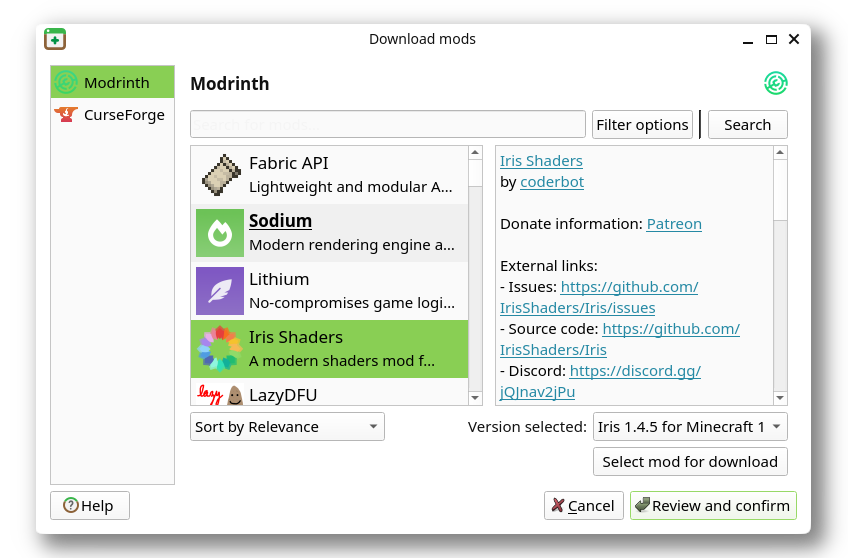
Mod management is central to Prism Launcher's workflow. It supports installing and maintaining mods, and connects with the CurseForge and Modrinth catalogues for finding compatible content. Players can add selected mods to an instance, update or remove them, and keep different combinations in separate setups. Modpacks can likewise be managed as distinct environments, which is useful when a pack has its own dependencies or when players want to compare configurations.
The interface is customizable, with layout options for keeping commonly used controls and instance information accessible. More experienced users can adjust advanced settings for individual game setups, while newcomers can use the launcher's instance-based organization to explore modded Minecraft without altering every installation at once. This makes it suitable for maintaining several worlds or multiplayer profiles, trying new mod combinations, and returning to older game versions.
Prism Launcher is free and open source. This Windows edition is intended for 64-bit Windows 10 and Windows 11 systems. Players should obtain Minecraft and any required game account separately; the launcher organizes and starts installations rather than replacing the game itself. As with other modded setups, compatibility can depend on the selected Minecraft version, mod loader and individual mods, so keeping each combination in its own instance can make troubleshooting and maintenance more straightforward.