Scribus for Windows 10 - Full description
Scribus is an open-source desktop publishing application for designers, small publishers, businesses and community groups creating print-ready documents. It provides page-layout tools for arranging text, images and graphic elements across single-page designs or longer publications. Projects such as brochures, newsletters, posters and books can be built as structured layouts rather than assembled as flat images, giving users control over both the appearance of individual pages and the consistency of a complete document.
Typography controls help refine text for different page sizes and reading purposes. Scribus supports OpenType fonts and adjustments including kerning, tracking and leading, so users can tune spacing and hierarchy in headlines, captions and body copy. Its drawing tools and Bézier curves are used to create and edit vector shapes, while layers help keep complex compositions organized. Master pages provide reusable page elements and layouts, reducing repetitive work in documents with recurring headers, footers or other shared design features.
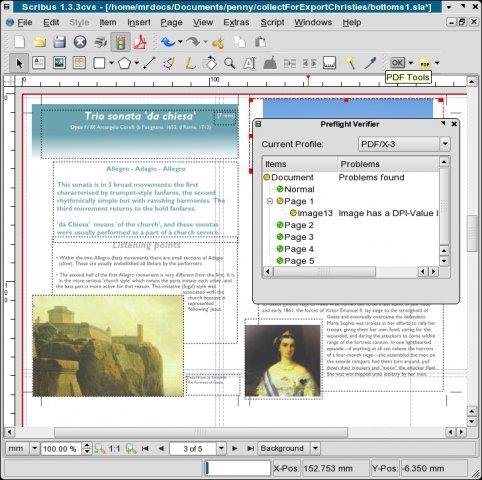
For print preparation, Scribus includes color-management tools with ICC profiles and support for spot colors. These features help manage color choices across a document and prepare work for professional output. The application can create PDFs and supports PDF/X-3 output, a standard used in print workflows. Users can export a finished layout for sharing or pass a print-oriented file to a production provider; checking the printer's requirements remains important because output settings and accepted formats can vary.
Scribus suits projects where page composition and output quality matter, from a local organization's event poster to a multi-page newsletter or a book layout. It can also be useful to people learning desktop publishing who need hands-on experience with typography, page structure, vector elements and prepress concepts. Its combination of layout, drawing and export tools keeps much of the production work in one application, while layered documents and master pages help manage revisions and repeated design elements.
Scribus is open-source software and is available for Windows, including Windows 10. Its publishing workflow is centered on designing pages and exporting files, rather than replacing a word processor for general-purpose writing. Users can consult the Scribus community, documentation and tutorials for guidance on layout and print preparation. The software is free to use under its open-source model, making it an option for individuals and organizations seeking desktop-publishing tools without a commercial license fee.