X-Proxy
... your online privacy and security. X-Proxy is a Windows 10 compatible application that allows you to surf the web anonymously, thereby protecting your personal information ...

Simple Internet Meter Lite monitors network traffic using packet data, distinguishing internet activity from local network traffic. It displays live usage in adjustable desktop meters and can track selected port ranges. Daily and hourly logs, automatic report saving, an animated tray icon and detailed netstat statistics help users review bandwidth use and identify which programs are using network ports. It is freeware and relies on WinPcap and PacketX.dll.
| Author: | PCWinTech |
| License: | Freeware |
| Price: | FREE |
| Released: | Aug 22, 2011 |
| File size: | 3.30 MB |
| Downloads: | 301 |
| Keywords: | Internet Meter, Bandwidth, netstat program monitor, Meter, network traffic meter, bandwidth usage tracker, port traffic monitor, Monitor Network, bandwidth monitoring, daily internet usage log, network traffic analysis, Windows 10 compatible, user-friendly interface, Simple Internet Meter Lite, Bandwidth Meter, Monitor, PCWinTech, internet bandwidth monitor |
| Author URL: | http://www.pcwintech.com/ |
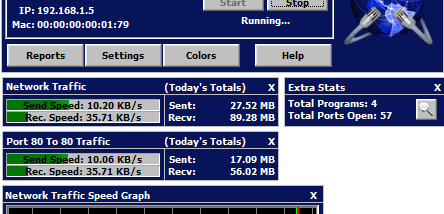

Simple Internet Meter Lite is a lightweight bandwidth monitor for people who want to see how much network traffic their computer sends and receives. It uses packet data to distinguish internet traffic from local network traffic, providing a view beyond a basic connection-speed display. The application also offers detailed statistics for checking which ports are active and which programs are using them.
Its on-screen monitors show network activity and can be resized to fit a preferred workspace. Users can adjust their colors, reduce the monitors to small, transparent displays, or enable desktop blending so the meters are less visually prominent. Ghost mode makes the monitors click-through, allowing mouse clicks to reach windows underneath. These options suit both persistent monitoring and occasional checks without taking over the desktop.
For reviewing usage over time, Simple Internet Meter Lite keeps daily and hourly logs and can automatically save reports to a file. It can monitor a range of ports, which helps focus traffic tracking on selected network activity. An animated system-tray icon provides another way to observe current traffic without keeping the larger monitors in view, while extra statistics offer additional network-use information.
The tray icon's right-click menu provides shortcuts to network connections and Windows Firewall settings, as well as tools for viewing and repairing network information. Detailed netstat data identifies ports in use and the programs associated with them, making the utility useful for investigating connections as well as measuring bandwidth. Typical uses include checking data consumption by hour or day, watching traffic during downloads, and seeing which applications are communicating over the network.
The program is freeware and relies on WinPcap and PacketX.dll to inspect packet data. Its stated operating-system support covers Windows XP through Windows 8, including listed 64-bit editions of Vista, Windows 7 and Windows 8; Windows 10 and Windows 11 are not included in that compatibility information. Users considering it on newer Windows releases should verify that the required packet-capture components and the application work in their environment.