Find My Ports
Welcome to the download page of "Find My Ports" - a groundbreaking software developed by the talented ... empowers users to effortlessly locate and manage their ports with utmost precision. With its sleek interface and ...

Simple Internet Meter monitors internet and local network traffic separately by inspecting packet data. It can track selected ports, show programs and ports using a connection, and keep hourly and daily usage logs. Users can set a bandwidth quota, configure an alarm when it is reached, and save reports automatically. Resizable, transparent monitors and an animated tray icon provide at-a-glance traffic information.
| Author: | PCWinTech |
| License: | Trialware |
| Price: | $12.95 |
| Released: | Aug 22, 2011 |
| File size: | 4.70 MB |
| Downloads: | 268 |
| Keywords: | PCWinTech, bandwidth monitoring, Simple Internet Meter, Network Information, traffic monitoring utility, internet bandwidth monitor, Internet, internet usage logs, x64 application, local network, bandwidth quota tracker, Bandwidth Quota, network port monitor, ports, Windows 10 software, local network traffic monitor, traffic, network traffic analysis |
| Author URL: | http://www.pcwintech.com/ |
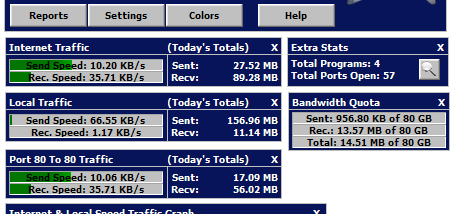

Simple Internet Meter is a bandwidth monitoring utility for Windows users who want to distinguish internet traffic from activity on their local network. It inspects packet data to classify traffic, rather than relying only on basic Windows network statistics, and can monitor selected ports as well as overall usage. Its quota controls and traffic history make it useful for people keeping an eye on capped connections or investigating network activity.
The program displays internet and local network traffic in separate monitors, with an additional statistics view showing programs and ports using the connection. Users can set a bandwidth quota and track consumption against it, configure an alarm for when the limit is reached, and arrange for quota usage to reset automatically. Daily and hourly logs preserve traffic totals for later review, and reports can be saved to files automatically.
The on-screen monitors can be resized, recolored, made transparent, or blended into the desktop. Ghost mode lets them remain visible while allowing clicks to pass through to windows underneath. An animated system-tray icon can indicate internet or local traffic, and its context menu provides shortcuts to network connections and Windows Firewall settings. These options support both a compact always-visible setup and a less intrusive monitoring arrangement.
Simple Internet Meter is intended for ongoing monitoring, including systems that remain active around the clock. Other programs can read its current data, enabling external displays such as a screensaver or compatible keyboard LCD. The package includes a screensaver and its Visual Basic 6 source code as an example for developers who want to access the meter's statistics. This makes the utility relevant not only to home users checking bandwidth, but also to programmers building network status displays.
The program uses WinPcap and PacketX.dll for packet-based traffic analysis and is offered as trialware. The operating-system compatibility information lists Windows XP, Vista, 7, and 8, including the specified 64-bit editions; it does not establish compatibility with later Windows releases. Its monitoring focus is traffic accounting and visibility, rather than controlling network access or replacing firewall software.