Web-Developer Server Suite for Windows 10 - Full description
Web-Developer Server Suite is a Windows-based web development and hosting environment for professionals, businesses, and individuals who want to build or run websites on their own computer or server. It brings Apache, PHP, and MySQL together in one application, providing the web server, scripting language, and database commonly used for dynamic websites. Its management interface is designed to make setting up websites and controlling the server components less dependent on manual configuration.
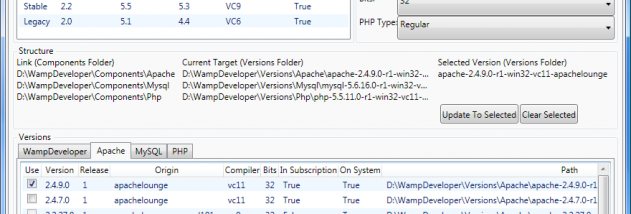
The Websites tab lets users add and manage individual websites from one place. Local DNS settings can be selected for those sites, supporting access through chosen local names during development. The Components tab provides controls for selecting Apache, PHP, and MySQL versions, which can help when a project needs a particular software setup. The System tab is used to control Apache, MySQL, and other services, and to view server status reports and IP information.
For content management and forum projects, the Web Applications tab can install WordPress, Drupal, Joomla, Magento, phpBB, and MediaWiki into a website and URL. This offers a direct route from creating a site to working with a ready-made application, rather than installing each platform separately. Proxy Pass settings can route selected requests to backend servers running Tomcat, IIS, or Nginx, allowing the suite to work alongside applications hosted by those services.
The suite is intended for both local development and website hosting. Developers can build and test PHP sites backed by MySQL, while site owners can use the same environment to host websites. Its one-click website creation and installation workflow is aimed at reducing setup tasks, and the component controls provide a way to manage the underlying server stack as projects change. It can also be used to explore or maintain popular web applications in a managed Apache, PHP, and MySQL environment.
Web-Developer Server Suite is freeware and runs on Windows. The application bundles several services that need to be managed as part of a working web platform, so users should consider their server configuration and the requirements of their own sites and applications. The supplied compatibility information includes Windows 10; it does not establish compatibility with Windows 11. The program is suited to users seeking an integrated Windows tool for creating, developing, and hosting dynamic websites rather than a standalone website editor.