eBook Info Grabber
eBook Info Grabber is a lightweight desktop utility for finding information about an eBook from its ISBN or title. It is intended for readers, collectors and cataloguers who want to retrieve book ...

Web-eReader is a desktop utility for browsing, viewing and printing saved web documents. It lets users navigate folders created in Windows Explorer, making it easier to find stored pages such as manuals, receipts, tickets and order records. Web pages can be saved from Internet Explorer or directly through the application, and the program is accessible from a system tray icon.
| Author: | RabitSoft |
| License: | Freeware |
| Price: | FREE |
| Released: | May 1, 2018 |
| File size: | 2.00 MB |
| Downloads: | 345 |
| Keywords: | x64 software, Reader, HTML Reader, Explorer, e-Book Reader, ebook reader, html reader, online reading tool, saved web pages, Web-eReader, e-Book, HTML reader, Read HTML, offline document reader, RabitSoft, Windows 10 compatible, print web pages, web page reader |
| Author URL: | http://www.rabitsoft.co.uk/ |
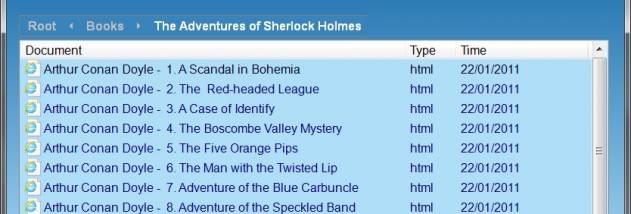

Web-eReader is a lightweight document browser for people who save web pages, manuals, receipts, tickets and other reference material for later. Rather than searching through unrelated files, users can keep saved items in a dedicated folder and open them through a compact desktop application. Its focus is quick access to locally stored web documents, with browsing and printing tools in one place.
The application provides a navigable view of saved documents. Users can browse through folders and open items without first locating each file separately in Windows Explorer. This is useful for keeping materials grouped by topic, project or purpose. The program does not require a special library structure: folders created in Explorer can be used to arrange the collection, then browsed from within Web-eReader.
Web pages can be saved from Internet Explorer using its Page menu and Save As command, or saved directly from Web-eReader. Once stored, pages can be viewed and printed from the application. Keeping a local copy can make frequently needed information easier to retrieve, including records such as order details and instructions. The system tray icon provides a quick way to open the program from the Windows taskbar.
Web-eReader is suited to home users and anyone who maintains a modest archive of web-based reference material. Typical uses include organizing saved manuals, retaining receipts or travel documents, and revisiting pages that may no longer be available online. Its folder-based approach works alongside familiar Windows file management, so documents can still be organized outside the application.
The program is freeware. Its original system requirements cover Windows XP through Windows 10; Windows 11 support is not established here. Web-eReader is a focused utility rather than a general-purpose file manager or online browser, and its usefulness depends on saving and organizing documents locally before browsing them.