Shellbag Analyzer & Cleaner
... the download page for the Shellbag Analyzer & Cleaner, an innovative software developed by the tech wizards at Goversoft LLC. This Windows 10 compatible software is a must-have for anyone seeking ...

Bloatware Removal Utility (BRU) helps Windows users find and remove unwanted pre-installed applications. It displays removable apps for review, scans the system, and carries out selected removals. Before changes, it can create a restore point, and it records actions in a log. The open-source utility supports Windows 7, 8, 10, and 11.
| Author: | Ricky Cobb |
| License: | Open Source |
| Price: | FREE |
| Released: | May 29, 2025 |
| File size: | 12.70 MB |
| Downloads: | 169 |
| Keywords: | bloatware removal utility, Removal, Utility, removal, cleaner, windows bloatware remover, optimization, pc bloatware cleaner, Windows 10, bloatware remover, Bloatware Removal Utility (BRU) free download, uninstall bundled software, remover, remove unwanted applications, utility, remove bloatware, download Bloatware Removal Utility (BRU, system cleaner, Bloatware, Ricky Cobb, remove preinstalled apps, remove, Bloatware Removal Utility (BRU), BRU, bloatware |
| Author URL: | https://github.com/arcadesdude/BRU |
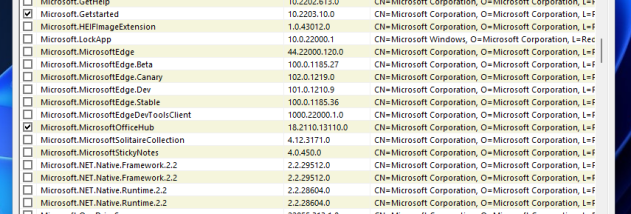



Bloatware Removal Utility (BRU) is an open-source Windows tool for finding and removing pre-installed applications that users do not want. It is intended for people cleaning up a new PC, reducing clutter in an existing Windows installation, or removing bundled programs they no longer use. Its focus is application removal rather than broad system tuning, so users can review candidate apps and decide what to keep before making changes.
BRU presents a list of applications that can be removed and lets users choose which ones to target. This review step is useful because a pre-installed app that is unnecessary to one person may still be useful to another. The utility scans for removable software and carries out the selected removals, helping users avoid manually searching through multiple Windows settings screens. Users who are less familiar with bundled applications can use the list to inspect their options, while experienced users can use it to work through unwanted software more directly.
Before making changes, BRU can create a Windows restore point, providing a way to return system settings to an earlier state if a removal causes an unwanted result. It also keeps a log of actions, which helps users see what was changed and refer back to removals when troubleshooting. These safeguards are particularly relevant when changing a system's installed software: reviewing the choices and keeping a record can make cleanup easier to manage than removing apps without tracking the process.
The utility is suited to one-time cleanup after setting up a computer as well as occasional maintenance when bundled applications are no longer needed. Removing unwanted items can simplify the installed-apps list and reduce software clutter; BRU is not a general-purpose optimizer and does not replace Windows security or maintenance tools. Its lightweight design is intended to keep its own resource use low while scanning and removing selected applications.
BRU supports Windows 11, Windows 10, Windows 8, and Windows 7, including 32-bit and 64-bit editions where applicable. It is distributed as open-source software. As with any utility that removes installed applications, users should review each selection before proceeding and keep a restore point available, especially on a computer where bundled programs may support particular hardware or workflows.