Bvckup 2
Welcome to the Windows 10 download page for Bvckup 2, a superior software solution developed by IO ... looking for a reliable and efficient backup solution. Bvckup 2 offers real-time, scheduled, and manual backups, ensuring ...

Bvckup is a Windows utility for backing up files and folders to local drives, external storage, or network locations. Jobs can monitor changes and update a destination in real time, or run on a schedule. Delta copying transfers only changed portions of files, helping reduce repeat data transfers. Logs, notifications, and verification processes support monitoring and troubleshooting.
| Author: | IO Bureau |
| License: | Trialware |
| Price: | FREE |
| Released: | Nov 27, 2024 |
| File size: | 3.40 MB |
| Downloads: | 147 |
| Keywords: | synchronization, delta copy backup, Backup Directory, IO Bureau, bvckup backup software, Sync, scheduled folder backup, incremental backups, file synchronization, Bvckup 2, data protection, Schedule, Backup Scheduler, windows file backup, Bvckup 2 free download, download Bvckup 2, backup, backup software, backup to network drive, Monitor, user-friendly interface, Backup, File Backup, incremental, real-time monitoring, real time file backup, file management, Windows |
| Author URL: | https://bvckup2.com/ |

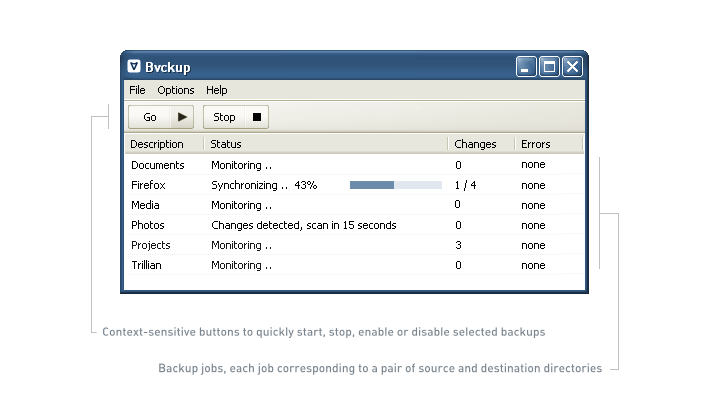



Bvckup is a Windows backup utility for users who want to copy files and folders to another location, either on a schedule or as changes occur. Its interface is designed around setting up and managing backup jobs, making it suitable for personal file protection as well as routine backup tasks in small offices and IT environments. Backups can be sent to local drives, external storage, or network locations.
A backup job pairs a source folder with a destination and specifies how copying should run. With real-time monitoring enabled, Bvckup watches selected files and folders and updates the destination after changes are detected. This is useful for keeping a working copy current without waiting for a manually started run. Jobs can also be scheduled, so recurring backups can take place at chosen times without requiring constant supervision.
For files that have changed, delta copying transfers only the modified portions rather than copying the entire file again. This can reduce transfer time and data movement, especially when handling large files over a slower connection or to a network destination. The program also supports full, incremental, and differential backup options, allowing job behavior to be adjusted to different storage and retention needs. Multi-threaded processing helps handle copying tasks efficiently, while the stated focus on low system impact supports running backups alongside everyday work.
Bvckup provides logs and notifications to help identify jobs that have failed or encountered an error. Its verification processes are intended to check backup data, and the resulting job history can help with troubleshooting and confirming that scheduled work has run. These tools are useful for anyone responsible for maintaining more than one backup job or for checking that an important folder is being copied reliably. The straightforward job-based workflow keeps routine tasks manageable without requiring users to build a complex backup setup.
The software is trialware and is intended for Windows. Supported systems include Windows 10 and 11, along with several older Windows desktop and Windows Server editions. It can be used to maintain a secondary copy of documents, project folders, or other frequently changed files on a separate drive or network location. Bvckup is a file-copying backup tool; users should choose destinations and backup settings that suit their own recovery needs, and keep another copy of important data where appropriate.