CSharp PDF Reports
Discover the power of PDF reporting with CSharp PDF Reports, a top-tier software developed by CSharp PDF Reports, designed specifically for Windows 10. This innovative software ...

C++Builder is a Windows IDE for developing native applications with modern C++. It combines visual interface design tools, a Clang-enhanced compiler, and libraries for Windows desktop UI, networking, and parsing. Developers can also use Boost and build tools such as CMake and Ninja, and target Windows or iOS. A trial is available.
| Author: | Embarcadero Technologies, Inc. |
| License: | Shareware |
| Price: | $1599.00 |
| Released: | Apr 14, 2022 |
| File size: | 156.15 MB |
| Downloads: | 552 |
| Keywords: | visual c++ app builder, c++ build tools, native c++ development, c++ code editor, C++Builder, native ios app builder, c++ editor windows, c++ development environment, Windows 10 compatible, x64 software, windows development, c++ ui design tools, Embarcadero Technologies, c++ ide, application development, programming tool, software development, native windows development, windows c++ compiler |
| Author URL: | https://www.embarcadero.com/ |
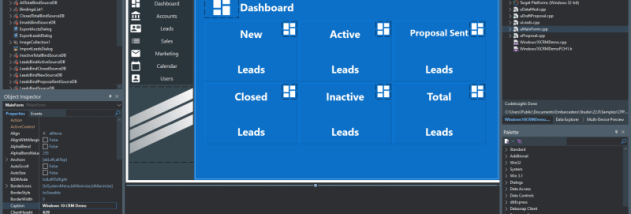

C++Builder is an integrated development environment for building native applications with modern C++. It is intended for independent programmers and development teams working on Windows desktop software, as well as developers targeting iOS. Its visual design tools and libraries bring interface design and C++ coding into one workflow, helping teams move from a prototype to a compiled application without treating the user interface as a separate project.
The IDE combines a modern C++ compiler with visual tools for designing desktop interfaces. Developers can lay out an application's interface visually, then implement its behavior in C++, making it practical to iterate on both appearance and functionality in the same environment. Libraries for Windows desktop UI support the creation of native interfaces, while the broader library collection covers common application needs such as networking and parsing. These components can reduce the amount of supporting code a project needs to maintain.
C++Builder includes a Clang-enhanced compiler and is designed to take advantage of multi-core hardware for compilation. It also provides access to popular C++ libraries such as Boost and build tools including CMake and Ninja. These options can help fit the IDE into existing development practices: a team can use familiar libraries and build tooling alongside its visual design and application libraries. The combination is relevant both to new projects and to developers maintaining established C++ codebases.
Typical uses include creating Windows desktop programs with a native interface, prototyping application concepts, and developing high-performance software where C++ is appropriate. Teams can use the visual tools to shape screens and the language and libraries to implement application logic, networking, and data parsing. The IDE's support for Windows and iOS targets makes it useful when a project needs native applications beyond a single desktop platform, though the development environment itself is for Windows.
C++Builder is commercial shareware, with a trial available through the developer. The stated system requirements call for Windows 10 or later, a dual-core processor running at 1.8 GHz or faster, at least 3 GB of RAM, and 6-60 GB of disk space. A DirectX 11-compatible display setup at 1440 × 900 or higher is also listed. The interface is available in English, French, German, and Japanese.