CPU-Z 1.79.1 review by Helio G.Avellar (Jun 13, 2017)


Very good software. I was looking for a freeware like that. None of the softwares I have downloaded worked in Win 10. Congratulations.

CPU-Z is a freeware utility that gathers detailed information about a computer's processor, motherboard and memory. It reports CPU clocks, voltage, supported instruction sets and cache data, along with motherboard and BIOS details, memory timings and module SPD specifications. It can also create a technical system report and calculate cache latency. The program runs from its unpacked files without a conventional installation.
| Author: | CPUID |
| License: | Freeware |
| Price: | FREE |
| Released: | Jan 18, 2024 |
| File size: | 2.06 MB |
| Downloads: | 3142 |
| Keywords: | system profiling, process, memory spd viewer, memory, clock, instructions, hardware diagnostic, size, processor, cache latency calculator, speed, hardware details tool, areas, core, cpu information utility, cpu speed up, processor speed monitor, x64 software, motherboard information, devices, CPU-Z, technology, Windows 10, freeware, CPUID, overclock, cpu |
| Author URL: | https://www.cpuid.com/ |
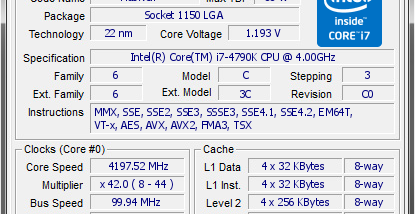

CPU-Z is a lightweight system information utility for people who want to inspect processor, motherboard and memory details without navigating through several Windows settings panels. It reads hardware information and presents it in one place, making it useful for checking component specifications, verifying a system configuration or collecting technical details for troubleshooting.
The processor section reports the CPU name and number, vendor, package, core stepping and manufacturing process. It also displays the current core voltage, internal and external clock speeds, and clock multiplier, along with supported instruction sets and cache details. These readings help users identify the installed processor and see its reported operating characteristics; CPU-Z also offers partial overclock detection. Cache information covers levels L1 through L3, including location, size, speed and technology.
For the motherboard, CPU-Z shows the vendor, model and revision, BIOS model and date, chipset information and graphic interface. The memory view reports the system's memory size, type, frequency and timings. For individual modules, it can read SPD data such as the vendor, serial number and available timing specifications. These details are useful when checking which memory is installed or comparing a system's reported hardware with its expected configuration. The utility also displays Windows and DirectX version information.
CPU-Z includes tools for producing a detailed system report that can contain CPUID, MSR, PCI device list, SPD and DMI information. A cache latency calculation tool provides an additional way to examine processor cache behavior. Together, these functions serve hardware enthusiasts, technicians and users who need a concise inventory or more technical diagnostic data, whether they are reviewing a new build, checking a possible upgrade or documenting a computer for support.
The program is freeware and runs without a conventional installation: its files can be unpacked into a directory and the executable launched from there. It does not copy files into Windows directories or write to the registry, and removing it involves deleting its files. CPU-Z is available for Windows, including Windows 10 and Windows 11. Its focused reporting makes it a practical reference utility, though the information it provides is intended for identifying and inspecting components rather than changing hardware settings.
Very good software. I was looking for a freeware like that. None of the softwares I have downloaded worked in Win 10. Congratulations.