CCleaner 5.84.9143 review by sujith (Sep 9, 2021)

very good

CCleaner is a Windows maintenance utility that removes temporary files, browser data and other selected clutter. Its Cleaner section separates Windows and application cleanup, with an analysis step to review potential removals before cleaning. It also includes a Registry section and additional tools and settings. Users can clear browser caches, cookies and history across supported browsers, as well as Windows temporary files, logs and Recycle Bin contents. Careful selection helps preserve useful cookies and records.
| Author: | Piriform Ltd |
| License: | Adware |
| Price: | $29.95 |
| Released: | Oct 21, 2026 |
| File size: | 1.70 MB |
| Downloads: | 10063 |
| Keywords: | run, adware, ccleaners, junk file removal, safe, free faster computer, clear browser history, registry cleaner, system optimization, remove temporary files, ccleaner, freeware, windows disk cleanup, ccleaner download, google earth, information, pc cleanup utility, documents, spyware, disk, clear, space, Piriform Ltd., Windows 10 compatible, internet history, CCleaner, privacy protection |
| Author URL: | https://www.ccleaner.com/ccleaner |


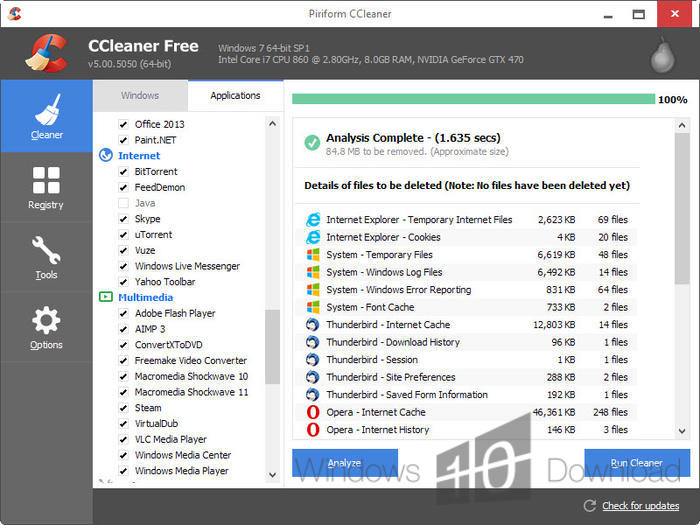



CCleaner is a Windows maintenance utility for removing temporary files and traces of browsing activity. It is intended for people who want to reclaim disk space and review common cleanup tasks in one place. Its Cleaner section separates Windows items from application data, allowing users to choose what to scan and remove rather than deleting every supported item by default.
A typical cleanup starts with an analysis that identifies selected files, followed by a separate cleaning step. CCleaner can remove temporary files, Windows log files, recent-document records and items in the Recycle Bin. For supported browsers, it can clear cached data, browsing history and cookies. Browser cleanup covers Internet Explorer, Firefox, Chrome, Opera and Safari, while application cleanup extends to data from supported third-party programs. Choosing items carefully matters: cookies and saved browsing records may be useful, and removing them can sign users out of websites or erase information they intended to keep.
The program also includes a Registry section for scanning and addressing selected registry entries, along with Tools and Options sections. These areas provide access to additional program functions and settings. Registry changes affect Windows configuration, so users should review proposed changes and retain a backup when one is offered. The layout puts the main sections in a left-side navigation panel, making the cleaning, registry and configuration areas easy to distinguish. The analysis-first workflow helps users inspect the proposed cleanup before running it.
CCleaner is useful for routine housekeeping on a PC that has accumulated temporary data, browser records or application leftovers. It can also help users who want to clear selected privacy-related traces without manually visiting every browser and Windows cleanup location. It does not replace file backups or general security software, and cleanup results depend on which categories are selected and which applications are installed.
The utility is available for Windows 10 and Windows 11, as well as older Windows releases. It supports multiple interface languages, including English, Spanish, German, French, Italian, Portuguese (Brazil), Russian, Turkish and Traditional Chinese. The supplied licensing information classifies the software as adware; users should review installation choices and bundled offers carefully. CCleaner is best treated as a selective maintenance tool: reviewing each scan and cleanup selection helps avoid removing data that is still needed.
very good