Disk Pulse Pro
Disk Pulse Pro is a file system change monitor for IT ... of applying one broad view everywhere. When changes occur, Disk Pulse Pro can display activity in real time and notify ...

DiskPulse Pro monitors one or more disks or directories for file-system changes in real time. It can focus on specific file types, save reports as HTML, Excel-compatible CSV, or text, send email notifications, and run custom commands when activity is detected. It is a trialware utility for monitoring storage activity on Windows PCs.
| Author: | Flexense Computing Systems Ltd. |
| License: | Trialware |
| Price: | $50.00 |
| Released: | Jun 18, 2024 |
| File size: | 6.57 MB |
| Downloads: | 375 |
| Keywords: | x64 software review, x64 logger, x64 viewer, real time folder monitor, file categorization, Flexense Computing Systems, disk activity logger, x64 dile activity monitor, x64 log disk activity, x64 disk activity monitor, x64 checker, file activity monitor, Disk Pulse Pro, advanced disk analysis, file system reports, real-time disk change monitoring, disk change monitor, file change alerts |
| Author URL: | https://www.syncbreeze.com/ |
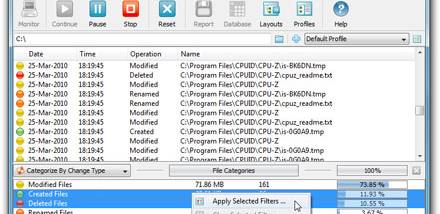



DiskPulse Pro is a file-system change monitor for Windows PCs, intended for users who need to keep track of activity on one or more disks or directories. It watches selected locations in real time and reports detected changes, making it useful for checking busy folders, keeping an eye on shared storage, or spotting unexpected file activity. Its monitoring is based on changes to the file system rather than general system performance, so it focuses on which monitored locations have changed.
A monitoring task can cover one or more disks or directories. Once the locations are selected, DiskPulse watches them and identifies file-system changes as they occur. This provides a practical way to follow activity in a specific project folder or across several storage locations without manually comparing their contents. Pro can also restrict monitoring to specific file types, helping narrow the results when only certain kinds of files matter. For example, a task can focus on selected document or media types instead of reporting activity across every file type in the monitored locations.
The program supports saving monitoring reports in HTML, Excel-compatible CSV, and plain-text formats. These options suit different follow-up tasks: HTML can be reviewed as a formatted report, CSV can be opened or processed in spreadsheet software, and text provides a simple record. Pro can automatically send email notifications when activity is detected, and it can run custom commands. These responses allow monitoring to fit into an existing workflow, such as forwarding an alert to an inbox or starting another task when a change occurs. They complement the live monitoring view with ways to preserve or act on the results.
DiskPulse Pro is suited to administrators, support staff, and other users who need visibility into changes on selected storage locations. It can help with routine checks of folders that should remain stable, review of ongoing work in shared directories, and recordkeeping for file activity. The ability to monitor several locations and filter by file type helps tailor a task to the amount and kind of activity that needs attention. Reports and alerts also make it easier to review changes later or respond without continuously watching the screen.
DiskPulse Pro is commercial trialware. It is the paid edition of DiskPulse, adding report export, file-type monitoring, email notifications, and custom command execution to the core real-time monitoring utility. The program is designed for 64-bit Windows systems, including Windows 10 and Windows 11. Users should choose monitored locations and filters to match their needs, since monitoring broader locations can produce more activity to review. Reports can be saved for later use, while notifications and commands provide options for handling changes as they happen.