FastFolders
... Windows Explorer. It adds browsing tools to Explorer's context menu, making it possible to reach folders and files ... menus. Users can browse into subfolders from the context menu and continue through the tree until they reach ...

VirusTotal Uploader adds a context-menu option for sending files from Windows to VirusTotal, an online service that checks them with multiple antivirus engines. It is useful for reviewing suspicious downloads or attachments and comparing detailed engine results. The freeware utility supports Windows 10 and 11; analysis is performed by the online service, not by a local antivirus scan.
| Author: | VirusTotal |
| License: | Freeware |
| Price: | FREE |
| Released: | Nov 25, 2017 |
| File size: | 143 kB |
| Downloads: | 185 |
| Keywords: | threat analysis, online malware scan, Context Menu, Uploader, multiple antivirus scan, virustotal uploader, malware detection, VirusTotal, online security, Send To VirusTotal, context menu uploader, VirusTotal Uploader, file virus checker, Upload, file scanning, send files to virustotal, antivirus integration |
| Author URL: | http://www.virustotal.com |
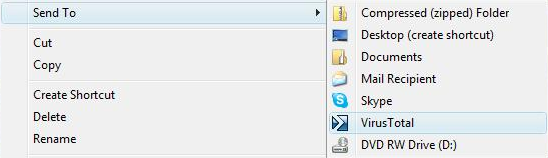

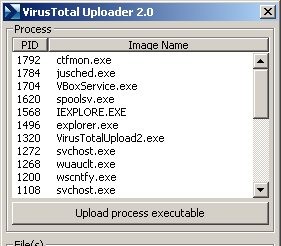
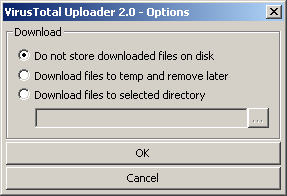

VirusTotal Uploader is a small Windows utility for submitting files to VirusTotal, an online service that checks suspicious files with multiple antivirus engines. It is intended for people who want a convenient way to request a second opinion on a file without navigating to the service and uploading it through a web page. The uploader connects a file on the computer with VirusTotal's analysis service; it does not replace antivirus software that protects the system continuously.
The program adds a VirusTotal submission option to the Windows context menu. In practice, a user can select a file in File Explorer, open its context menu and send it for analysis. This makes it useful when inspecting a download, an email attachment saved to disk or another file whose origin or behavior is uncertain. The utility is designed around individual file submissions rather than managing a full antivirus scan of the computer.
After a file is submitted, VirusTotal checks it using multiple antivirus engines and provides detailed results from those engines. Comparing results can help distinguish a single detection from a broader pattern of warnings, while also showing which engines reported a concern. VirusTotal updates its virus signatures automatically, so the service's analysis draws on current detection data. Results are intended to support investigation; a scan outcome is not, by itself, a guarantee that a file is safe or malicious.
VirusTotal also provides global statistics about malware detections, while the uploader's central role is to make file submission accessible from the Windows desktop. It can fit into a cautious download-review workflow alongside an installed antivirus product: submit a questionable file, review the analysis, then decide whether to keep, remove or investigate it further. As with any online file-analysis service, users should consider whether a file contains private or confidential information before submitting it.
VirusTotal Uploader is freeware and supports Windows, including Windows 10 and Windows 11, as well as earlier Windows releases. Its small footprint and context-menu integration suit occasional checks without requiring a separate, complex scanning interface. The service performs the multi-engine analysis online; the uploader provides a direct route for sending files from the local system.