Music DJ
Welcome to the ultimate destination for all music enthusiasts! Discover the extraordinary world of "Music DJ," ... application is a must-have for aspiring DJs and music aficionados alike. With its sleek interface and intuitive ...
Dj Mixer turns a Windows tablet or PC into a two-deck music mixing setup for parties and casual DJ practice. Each deck has independent volume, position and timing controls, with a crossfader for moving between tracks. Users can build and reorder a playlist while playing, search songs, save and load playlists, or let Automix handle transitions. Pitch adjustment, touch-based scratching, a four-band equalizer and beat and EQ peak displays support hands-on mixing. It uses tracks from the Music Library and does not play DRM-protected songs.
| Author: | KetoLabs |
| License: | Freeware |
| Price: | FREE |
| Released: | May 22, 2013 |
| File size: | 19.41 MB |
| Downloads: | 1546 |
| Keywords: | KetoLabs, Automix, library folder, music, windows 8 app, Windows 10 software, cross fader, dj mixer app, audio blending software, music mixing, Dj Mixer, music mixing software, music mixing tool, crossfader music app, playlist mixing app, x64 application, two deck music mixer, automatic dj mixing |
| Author URL: | http://apps.microsoft.com/windows/en-us/app/dj-mixer/a97cbf0d-e2a3-4e03-beb8-dd4f9eab3f7b |
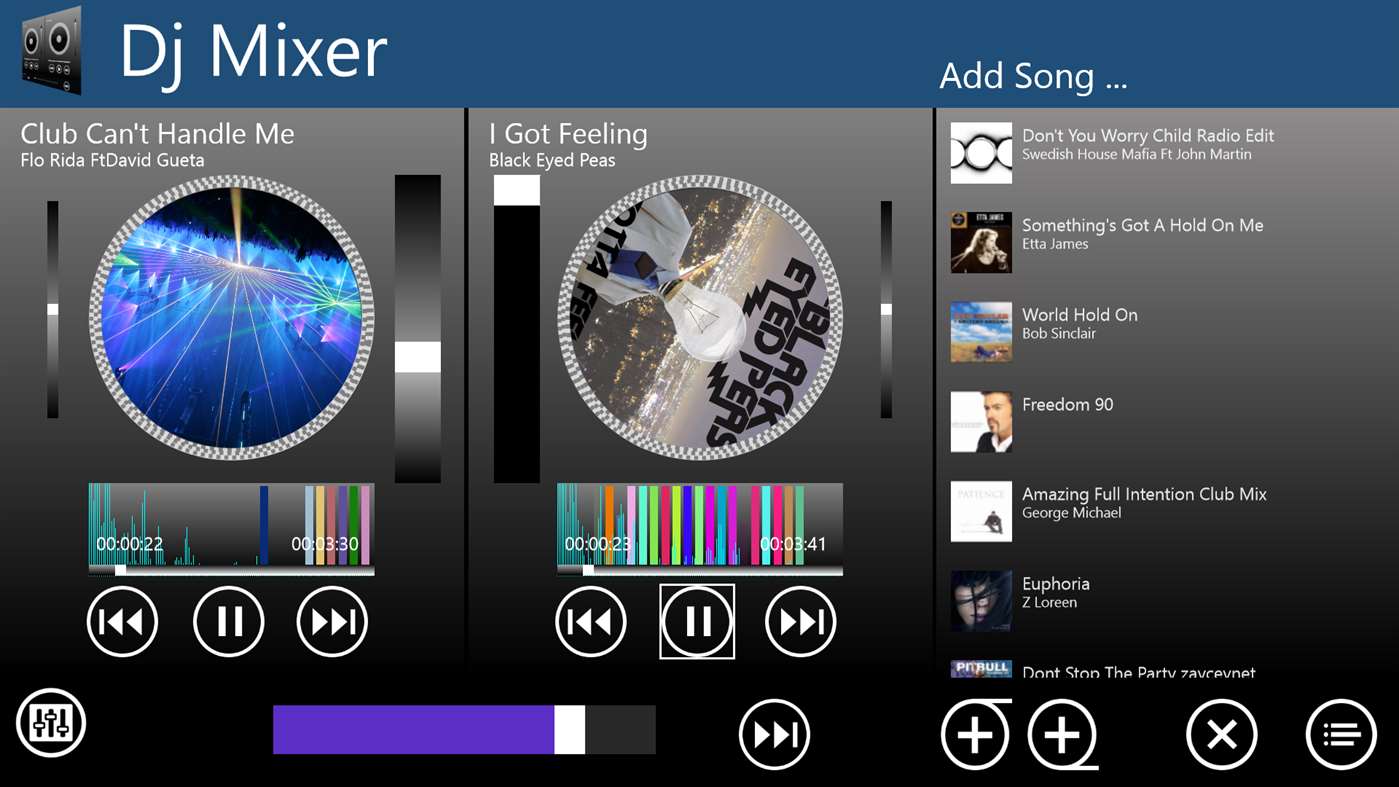

Dj Mixer is a two-deck music mixing app for Windows tablets and PCs, aimed at people who want to play and blend tracks without a dedicated hardware controller. Each deck has its own position control, volume adjustment and timer, while a central crossfader shifts the output between decks. Music can be selected during a session, making it possible to build and change a queue as a party or informal mix progresses.
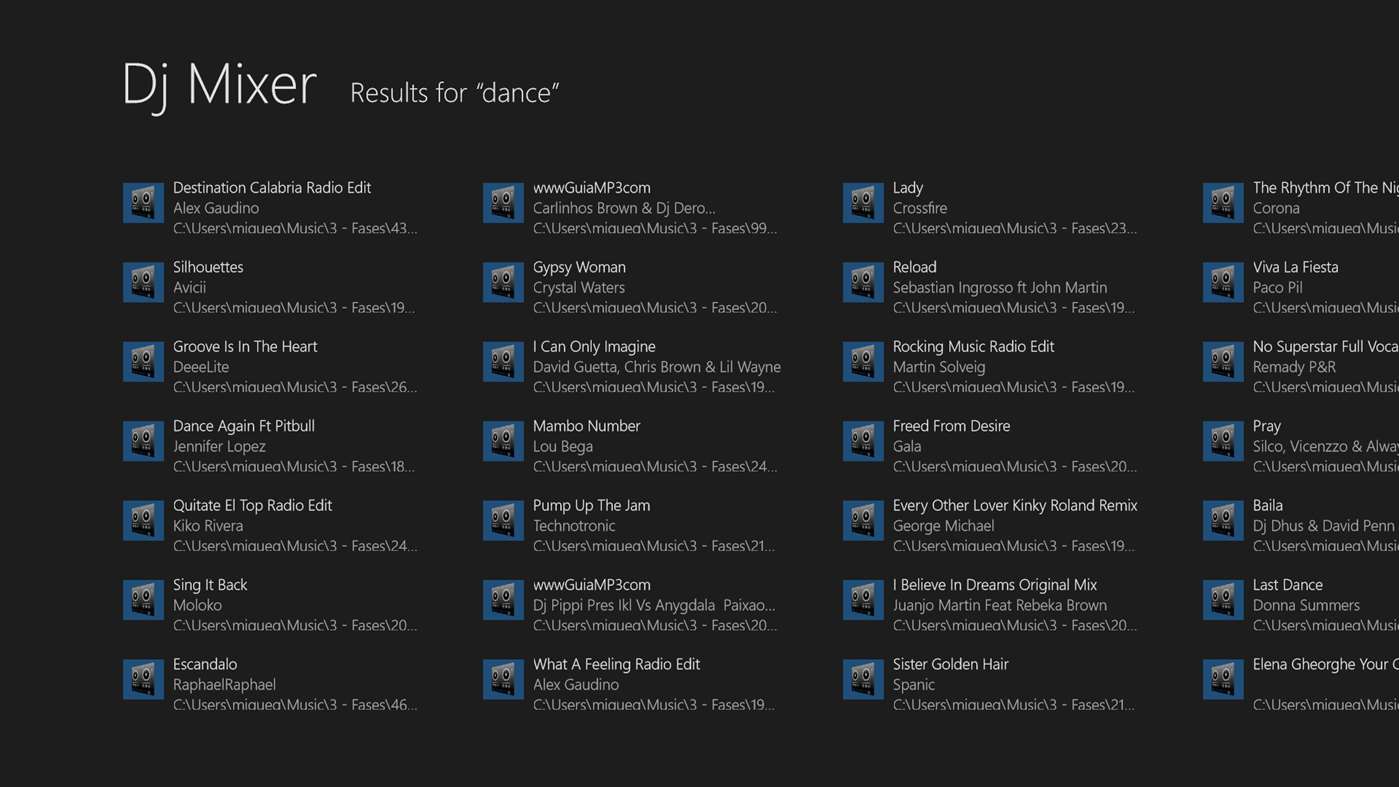
The editable playlist supports adding tracks on the fly and changing their order. A search box helps locate songs in the available library, and a random-sort control can shuffle the queue. Playlists can also be saved and loaded, which is useful for keeping prepared selections for different occasions. The app reads music from the PC's Music Library folder and its subfolders; DRM-protected tracks are not supported.
For manual mixing, Dj Mixer provides pitch control to adjust playback speed and lets users touch a deck's on-screen disc to spin or scratch. Pausing and resuming use a gradual stop and restart of the disc rather than an abrupt transition. Wide deck faders and a wide crossfader provide on-screen controls suited to touch operation. Beat and equalizer peak displays offer visual feedback while tracks play, and a four-band graphic equalizer allows tonal adjustment.
Automix handles transitions automatically when a hands-on mix is not needed, keeping music playing through a session. The two-deck layout, live queue editing and saved playlists suit casual home listening, parties and basic DJ-style practice. The interface combines transport, mixing and playlist controls in one app, so the main workflow is selecting tracks, balancing the decks and moving between them with the crossfader.
Dj Mixer is freeware and does not include advertising or in-app purchases. It is intended for Windows 8 and Windows 10 devices, including supported tablet configurations. Tracks must be accessible through the Music Library location, and songs protected by DRM cannot be added. Its controls and monitoring features support straightforward playback and mixing rather than advanced production or effects work.