Qupil
... to the download page for Qupil, an exceptional Windows 10 software developed by the talented Felix Hammer. Qupil is a versatile and user-friendly application designed ...

Easy Label Printer is a Windows utility for printing postal addresses on label sheets. Addresses can be typed in or imported from the Windows Address Book or Contacts. It formats address text automatically and can print one label at a chosen position, a full sheet, or a batch in between. User-defined contact categories help organize recipients for bulk mailings, and support for different label sizes suits a range of label stock.
| Author: | Studio Soft |
| License: | Shareware |
| Price: | $30.00 |
| Released: | Feb 14, 2023 |
| File size: | 2.30 MB |
| Downloads: | 206 |
| Keywords: | address printer, printer, windows contact labels, print mailing labels, Easy Label Printer, address label printer, label printing solution, user-friendly interface, print address labels, Windows 10 software, print label, Label Printer, label printing software, bulk mailing labels, x64 compatibility, address, Studio Soft, label |
| Author URL: | http://www.studio-soft.co.uk/ |
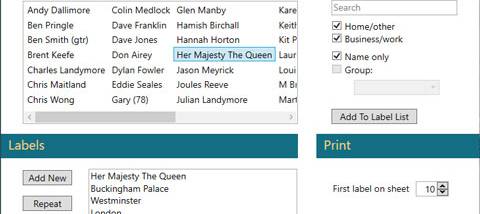



Easy Label Printer is a Windows program for printing postal addresses on sheets of adhesive labels. It is intended for home users and small offices that need to prepare individual labels or batches of outgoing mail without setting up a mail-merge document. Addresses can be entered directly in the program or brought in from the Windows Address Book or Contacts, giving users a choice between typing a recipient as needed and working from saved contact records.
The printing options cover a single label, a full sheet, or a selection between those extremes. For a one-off mailing, a user can print just one address; for a larger mailing, the program can print many labels in a run. It also supports selecting a label position on the sheet, which is useful when a partially used sheet still has blank labels. Automatic formatting arranges address text for the label, reducing the need to lay out each label manually.
The program is designed to work with labels of any size. This flexibility makes it suitable for different label sheets rather than only one fixed format. Contacts can be assigned user-defined categories, allowing addresses to be grouped for bulk mailings. Categories help separate recipient groups when preparing targeted batches, while address-book integration avoids retyping details already stored in Windows contacts.
Typical uses include printing return addresses, preparing envelopes for personal correspondence, and producing labels for a business mailing. A single label can handle an occasional package or letter, while page and batch printing serve recurring or larger mail jobs. Because the program prints labels directly and does not require a mail merge, it offers a focused alternative to building a document template in a word processor.
Easy Label Printer is shareware and is available for Windows 10 and Windows 11, as well as several earlier Windows releases. It works with physical label sheets and a printer; the sheet size and label placement should be matched to the stock being used for reliable alignment. Users can add recipients manually or use existing contacts, then choose how much of the sheet to print. Its central purpose is address-label layout and printing rather than general document design.