Movavi Screen Capture Pro
Welcome to the download page of Movavi Screen Capture Pro for Windows 10! Developed by the renowned Movavi Software Ltd., this powerful screen recording software is designed to meet the needs ...

HyperCam records computer screen activity, including cursor movements and menu selections, along with microphone audio, system sound or both. Frame-rate and compression controls help balance recording quality and file size. Its built-in editor can trim or join clips and add text annotations, while customizable hotkeys provide quick access to recording functions. It is suited to tutorials, presentations, demonstrations and webinar captures.
| Author: | Solveig Multimedia |
| License: | Demo |
| Price: | $39.95 |
| Released: | Mar 20, 2026 |
| File size: | 65.70 MB |
| Downloads: | 425 |
| Keywords: | x32 bit application, HyperCam recording, screen capture software, capture, record desktop, record tutorials, Hyper Cam, record, Hyperionics Technology, Windows 10 compatible, screen, capture desktop, screen recording software, screen recorder with audio, video capture software, video editing tool, record computer screen, screen capture, screen capture tool |
| Author URL: | https://www.cleverbridge.com/713/cookie?affiliate=3043&redirectto=http%3a%2f%2fwww.solveigmm.com%2fe |

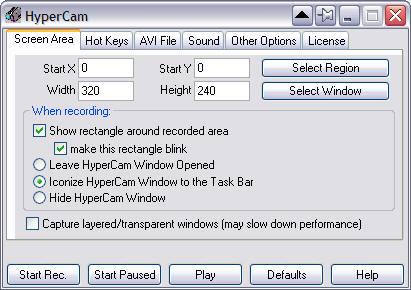

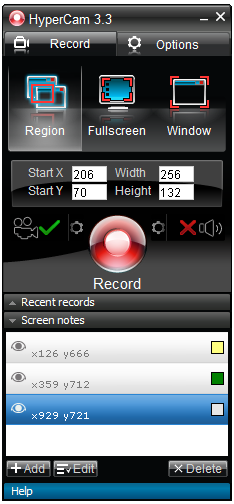




HyperCam is a desktop screen-recording program from Solveig Multimedia for people who need to capture activity on a computer display with accompanying audio. It records actions such as cursor movement and menu selections, making it suitable for instructional videos, software demonstrations, presentations, webinars and other screen-based material. Its controls are intended to support straightforward recording while providing settings for users who want to adjust the output.
During a capture, HyperCam can record microphone input, system audio or both together. Microphone recording is useful for spoken explanations and narration, while system audio can preserve sounds from applications or online content. Recording both sources allows a presenter to talk over a demonstration while retaining its original audio. Frame-rate and compression controls help balance motion smoothness, visual quality and resulting file size for different uses.
The program also includes a video editor for basic work after recording. Users can trim unwanted sections, join clips and add text annotations without moving the material to a separate editing application. Support for multiple video formats helps recordings fit a range of playback and editing workflows. Customizable hotkeys provide quick access to recording functions, which can be useful when operating a demonstration or presentation without switching repeatedly to the program window.
HyperCam can be used by educators preparing lessons, content creators making tutorials, businesses documenting software procedures and presenters capturing demonstrations. It can also record streaming video or webinars for later reference, subject to the applicable rights and permissions. Capturing cursor actions and interface interactions makes the resulting video easier to follow when the subject is a process performed on screen rather than a static image.
HyperCam is commercial demo software from Solveig Multimedia. It is offered for Windows, including Windows 10 and Windows 11, and also supports earlier Windows releases. The x32-bit edition is intended for 32-bit Windows; the software listing also identifies compatibility with 64-bit Windows 10. Its recording, audio and editing options provide a single workflow for making and preparing screen videos, while the demo license should be considered before relying on it for ongoing use.