PDF Page Lock
Welcome to the download page of PDF Page Lock, a powerful and user-friendly software developed by PDF Page Lock. Designed specifically for Windows 10, this exceptional tool ...

InTouch Lock is a password-protected Windows utility for restricting access to files, applications, system settings and web resources. It supports multiple users and profiles, with presets for child, guest, kiosk and workplace setups. A scheduler can lock or shut down the PC, while event logging records activity for later review. Profiles can be exported to reuse restrictions on other computers.
| Author: | Lovelysoft |
| License: | Trialware |
| Price: | $34.85 |
| Released: | Apr 23, 2015 |
| File size: | 3.10 MB |
| Downloads: | 332 |
| Keywords: | Lovelysoft, x64 software, privacy protector, web access restriction, restrict application access, protect, lock, Windows 10, restrict, shared pc security, windows access control, InTouch Lock, privacy protection, parental control utility, lock files and folders, restrict access, access control, access restriction |
| Author URL: | http://www.lovelysoft.com/ |
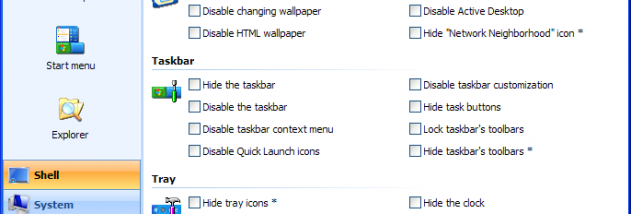



InTouch Lock is a password-protected security utility for home users and system administrators who need to limit access to Windows features, applications, files and online resources. It applies restrictions through user and security profiles, making it possible to tailor a PC for different people or purposes, such as a child's account, a shared workstation, a guest session or a kiosk.
The program can protect files and folders from copying, deletion or modification, and prevent selected applications from launching. It also controls access to drives, removable storage and optical-disc devices, including restrictions on using USB flash drives and connecting to network services. Windows areas such as the Desktop, Start menu, Control Panel and its modules can be restricted, alongside system settings and more than 80 operating-system parameters. For shared computers, these controls can help keep users within a defined set of tasks.
Internet controls cover access to web resources and selected types of site content, including social networks, chats, message boards, blogs and torrent trackers. InTouch Lock can also disable system hotkeys and key combinations, block windows or prevent processes from running. Restrictions generally take effect without restarting Windows. A one-click lock is available when someone needs to step away from the PC, while password protection guards the utility's settings and helps prevent unauthorized removal or shutdown.
Profiles can be assigned to multiple users, exported and imported to copy a configuration between computers. Predefined options include Child, Working place, Kiosk mode and Guest. A built-in scheduler can run actions at set times, when the computer is idle or when Windows starts; actions include locking the screen, shutting down the PC and launching external programs. Event logging records program activity for review in the built-in Event Viewer, and customizable hotkeys provide shortcuts for activating or deactivating protection. Stealth mode hides the program icon from the notification area.
InTouch Lock is trialware intended for Windows PCs. The supplied operating-system support covers Windows XP through Windows 10, including supported 64-bit editions of Vista, Windows 7 and Windows 8, as well as Windows 10 x64. It is suited to households, public-access computers and workplaces that need centrally repeatable restrictions on local access and system use. Its range of controls makes it important to keep the administrator password and exported profiles in a secure place.