Edi - Text Editor
Welcome to the download page for Edi - Text Editor, an innovative software solution developed by Polenter - Software Solutions. This Windows 10 compatible software is a game-changer for those who ...

MemPad is a plain-text outliner and note-taking program that stores its pages in one file and organizes them in a structured index. Users can create nested nodes, link pages to websites or local and network files, search and replace text, and export selected pages or entire collections. Diary indexing, automatic saving, backups and password-protected encryption support personal and work notes.
| Author: | Horst Schaeffer |
| License: | Freeware |
| Price: | FREE |
| Released: | Feb 21, 2022 |
| File size: | 225 kB |
| Downloads: | 310 |
| Keywords: | Horst Schaeffer, single file notes, x64 software, text editor, MemPad, text encryption, hierarchical note taking, outline, Windows 10, text diary software, plain text outliner, mempad notes, edit, encrypted notes, note-keeping utility, encrypt, text outliner |
| Author URL: | https://www.horstmuc.de/ |
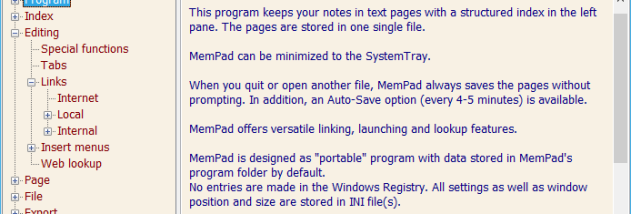

MemPad is a plain-text outliner and note-taking program for organizing information into linked pages. Its structured index lets users arrange notes as a hierarchy of nodes, making it suitable for personal reference files, project notes, research material and diaries. All pages are stored in a single file, so a collection can be kept together rather than scattered across separate documents.
The index can be changed with buttons, context menus or keyboard shortcuts. Users can move nodes quickly, sort sibling entries in ascending or descending order, and search across all pages or within a selected node. Search can continue forward or backward, and a replace function helps update repeated text. Pages can link to one another, while links to websites, local files, folders and network locations provide routes from notes to related resources. File links can use environmental variables, and full paths are not always required.
For everyday editing, MemPad includes cut, copy, paste, undo, drag and drop, word wrap, and insertion of the current date or time. A memory stack records pages and text positions, allowing browser-style backward and forward jumps. Read-only files are handled, and pages can be locked individually or globally. The program saves changes automatically when it is closed or another file is opened; optional timed saving and automatic backups provide additional protection. Users can restore the last backup or reload a file. Notes can also be imported or exported by page, node or complete file, sent directly to another program, or created from an inserted text file.
MemPad includes a diary mode with a year, month and day index, plus a shortcut to open or create the current day's page. User-defined popup menus can insert words or expressions, optionally including date and time tokens, while configurable web lookups can send selected text to a dictionary or other service. A small launcher is available from the toolbar, menu or system tray. Display and access options include a selectable font and background color, minimizing to the system tray, a configurable hotkey, always-on-top mode and keyboard shortcuts for quitting or minimizing.
The program is freeware and supports Windows 10 and Windows 11, as well as earlier Windows releases. Its interface is available in multiple languages. MemPad works with file environments organized by extension or directory, each with its own INI settings file, and does not create Registry entries. Password-protected encryption is available for stored information. These features make it useful for keeping a portable, structured collection of notes and reference material in a single file.