Moo0 DiskCleaner Portable
Moo0 DiskCleaner Portable is a Windows utility for removing unwanted ... than applying one fixed cleanup routine every time. Moo0 DiskCleaner also handles private data stored in the registry ...

Moo0 DiskCleaner removes selected temporary files and other supported data from Windows. Its checklist covers more than 130 cleanup targets, including system temporary files, registry privacy data, and cache, history and cookies from Internet Explorer, Firefox and Opera. Users select categories and start a cleanup with one button, or configure the program to run automatically when Windows starts. It is freeware for supported Windows versions.
| Author: | Moo0 |
| License: | Freeware |
| Price: | FREE |
| Released: | Jul 15, 2019 |
| File size: | 4.00 MB |
| Downloads: | 295 |
| Keywords: | remove cookies, junk file removal, eraser, system privacy cleaner, windows disk cleaner, Windows 10 compatibility, temporary file cleaner, Disk Cleaner, Moo0 DiskCleaner, user-friendly interface, browser cache cleaner, free disk space recovery, file wiper, system optimization, HDD, clear browser history, HDD cleaner, cleaner |
| Author URL: | https://www.moo0.com/ |
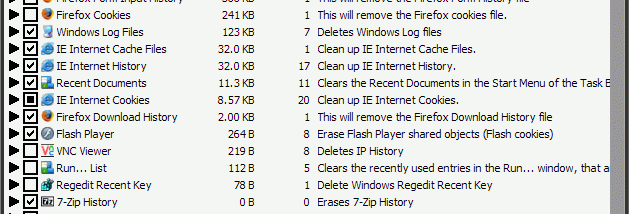

Moo0 DiskCleaner is a Windows utility for removing temporary files and other selected data that accumulates during everyday computer use. It is intended for people who want a straightforward way to clear common system and browser clutter without manually locating each file or browsing through individual application settings. Its checklist-based interface makes the cleanup scope visible before the operation begins.
The program supports more than 130 types of cleanup targets. These include system temporary files and browser cache, history and cookies for Internet Explorer, Firefox and Opera. Users choose the categories they want to remove by checking them in the interface, then start the operation with the Clean Now button. Selecting only relevant categories helps keep a cleanup focused; browser cookies or history, for example, can be retained if they are still useful.
Moo0 DiskCleaner can also remove private data stored in the registry. The available targets cover several kinds of system and browsing traces, so the checklist is central to deciding what should be cleared. The program can be configured to run automatically whenever Windows starts, which suits people who prefer regular cleanup rather than remembering to launch the utility manually. Users who enable this option should review their selected items first, since those choices determine what is removed at startup.
Typical uses include reclaiming space occupied by temporary files, clearing browser data on a shared computer, and applying a repeatable cleanup routine. It provides a direct alternative to searching for each supported category by hand, while allowing users to choose which groups of data to include. It is a cleanup utility rather than a general-purpose file manager; its role is to remove selected supported traces, not to organize personal documents.
Moo0 DiskCleaner is freeware. The supplied compatibility information covers Windows XP, Vista, 7, 8 and 10, including listed 64-bit editions where applicable; Windows 11 compatibility is not established here. The program is a small download, and its simple checklist workflow is suited to occasional manual use or an automatically triggered startup cleanup.