Sticky Password PRO
Sticky Password PRO is a password manager and online form filler for people who ... signing in and completing web forms. It stores passwords and personal details for reuse, helping users keep ...

qtpass is a graphical password manager that creates and organizes credentials in an encrypted password store. It uses GPG protection and supports the pass format, with settings for password character types and an option to copy generated passwords to the clipboard. A notes field lets users keep comments with an entry. Initial setup may require familiarity with Qt and GPG keys.
| Author: | IJhack |
| License: | Open Source |
| Price: | FREE |
| Released: | Oct 6, 2026 |
| File size: | 39.40 MB |
| Downloads: | 48 |
| Keywords: | qtpass, password generator, encrypted password store, gpg password manager, qtpass password manager, GNU, qtpass download, qtpass free download, passcard, password, generate passkey, pass password manager, GPG, passcode manager, download qtpass |
| Author URL: | https://qtpass.org/ |


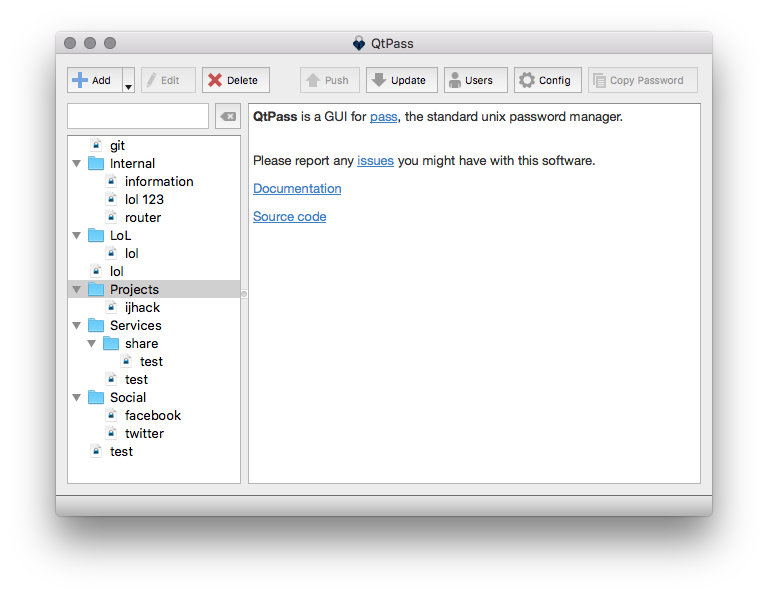


qtpass is a graphical password manager for creating and maintaining password entries with the pass password-store format. It is intended for people who want a desktop interface for managing credentials while keeping their stored data protected with GPG encryption. The application can generate passwords and save them in an encrypted store, rather than leaving account details as ordinary text files.
GPG provides the cryptographic protection for the password store. Users configure a GPG key to encrypt entries, then use qtpass to work with the resulting passwords through its interface. The program also offers a choice between pass and GPG for encryption, making the encryption method part of the setup. Because the store depends on GPG and the application requires Qt, installing and configuring those components may take extra effort, especially for users unfamiliar with public-key encryption.
Password generation settings let users choose which character types to include, so generated credentials can be adjusted to different requirements. When an entry is created, its password can be copied to the clipboard for use in a login form or another application. A comments field allows extra notes or observations to be kept alongside a password, which can help distinguish entries or preserve relevant context. These options bring common password-management tasks - generating, storing and retrieving credentials - into one desktop workflow.
qtpass can suit individuals who want stronger, randomly generated passwords without having to remember each one, as well as users who already rely on GPG or the pass format. It is useful for keeping credentials in an encrypted collection and retrieving them when needed. The interface is designed to make the store easier to operate, but some familiarity with GPG keys, encryption choices and the underlying tools can make initial configuration more straightforward.
The application is open source and available at no cost for 64-bit Windows 10 and Windows 11. Its setup depends on Qt and GPG-related components, so those requirements should be considered before use. As with any password manager, access to the encrypted store depends on retaining the appropriate key and protecting it; the encryption does not remove the need for careful key management.