Howard Email Notifier
... your one-stop destination for downloading the exceptional "Howard Email Notifier" software, a product of the renowned "The SZ Development". This Windows 10 compatible software is a must-have tool for those who ...

SimplyFile is a Microsoft Outlook add-in that learns from filing choices and suggests folders for messages. Users can file individual emails or selected groups, organize sent items, create folders while filing, and defer messages for later action. Search and retrieval tools help locate filed mail, while customization settings let users adjust the workflow. It is designed for people who want to manage correspondence inside Outlook with less manual folder navigation.
| Author: | TechHit.com |
| License: | Trialware |
| Price: | $59.88 |
| Released: | Apr 17, 2026 |
| File size: | 3.00 MB |
| Downloads: | 384 |
| Keywords: | move message, filing assistant, SimplyFile, Windows 10 compatible, file emails, email folder organizer, outlook mail organizer, automatic email filing, productivity tool, message, Outlook add-in, email, TechHit, email filing add-in, bulk email filing, outlook email filing, organizer, email management |
| Author URL: | https://secure.bmtmicro.com/servlets/RIP.DemoDownload?PRODUCTID=46950010&AID=2703408 |


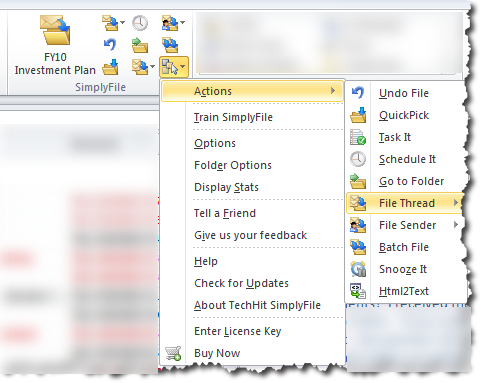

SimplyFile is an email filing add-in for Microsoft Outlook, intended for people who manage correspondence across multiple folders and want to spend less time sorting messages by hand. It works within Outlook and uses a record of a user's filing choices to suggest folders for messages. As those choices accumulate, the suggestions can help make routine filing quicker while keeping messages organized in the folder structure already in use.
The central workflow is to select one or more messages and use SimplyFile's suggested destination to file them. Its filing recommendations are based on learned patterns in prior filing activity, so users can choose a relevant folder without navigating through the full folder tree each time. For messages that need a different destination, they can select another folder. The same approach supports bulk filing, allowing a group of selected emails to be moved together rather than processed individually.
SimplyFile also supports filing sent items, which helps keep outgoing correspondence with related messages. Users can create folders while filing, avoiding a separate trip to Outlook's folder-management controls when a new category is needed. A defer option lets users put messages aside for later action, separating items that require follow-up from those ready to be filed. Search and retrieval features help locate messages after they have been moved, while customization settings allow the filing workflow to be adjusted to individual preferences.
The add-in is suited to professionals and other Outlook users who handle recurring email topics, large volumes of correspondence, or archives organized into many folders. Suggested filing can reduce repetitive folder selection, while batch actions are useful when cleaning up an inbox or organizing older messages. The workflow remains centered on Outlook, so it is aimed at users who want assistance with email organization there rather than a separate mail client.
SimplyFile is trialware from TechHit.com. It is available for Windows 10 in 32-bit and 64-bit editions, Windows 11, and Windows Server 2016, 2019, and 2022. It requires Microsoft Outlook as the host application; the applicable Outlook edition and configuration should be checked before installation. The add-in focuses on filing and follow-up organization, complementing Outlook's existing mail folders rather than replacing them.