Notes
... to-do lists, all in one place. With its sleek and user-friendly interface, you can easily create, edit, and organize notes without any distractions. "Notes" supports ...

Discover Sleek, the innovative application developed by ransome1, designed to elevate your Windows 10 experience. This cutting-edge software combines a minimalist interface with powerful functionality, allowing users to streamline their tasks effortlessly. Sleek enhances productivity by providing a seamless environment for managing notes, to-do lists, and reminders, all while maintaining an elegant aesthetic. Perfect for both casual users and professionals, Sleek is your go-to solution for organized living. Download now and transform the way you work!
| Author: | ransome1 |
| License: | Open Source |
| Price: | FREE |
| Released: | Nov 30, 2025 |
| File size: | 79.10 MB |
| Downloads: | 48 |
| Keywords: | productivity, note, monitor tasks, to-do, due date, GitHub, ransome1, sleek free download, customizable, sleek, open-source, task, user-friendly, to-do manager, organization, software, task manager, download sleek |
| Author URL: | https://github.com/ransome1/sleek |

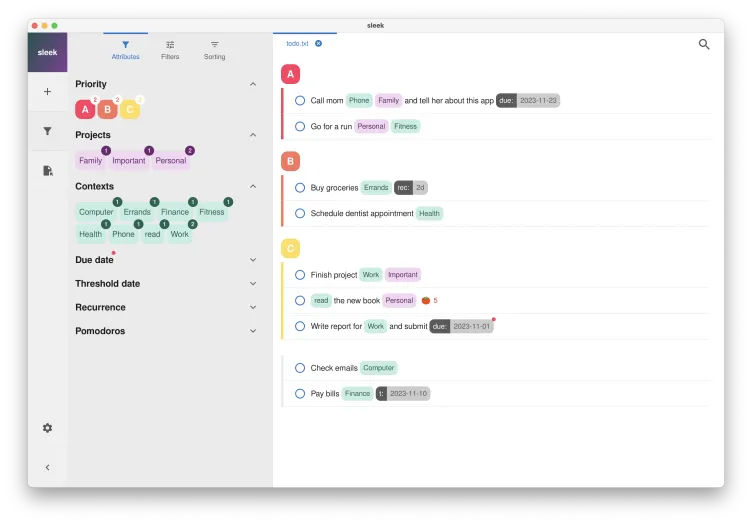
Discover "Sleek," the innovative software developed by ransome1, designed to elevate your Windows 10 experience. This cutting-edge application seamlessly integrates into your workflow, offering a minimalist interface that prioritizes efficiency and user-friendliness. Sleek is perfect for those who appreciate a clean aesthetic without sacrificing functionality.
With its intuitive design, you can easily manage tasks, notes, and reminders, all in one place. The customizable features allow you to tailor the application to your unique preferences, ensuring that you stay organized and focused. Whether you’re a student juggling assignments or a professional managing projects, Sleek adapts to your needs, enhancing productivity without overwhelming you.
Join the growing community of users who have embraced Sleek for its simplicity and effectiveness. Download now and transform the way you work on Windows 10!