Spam Reader for Windows 10 - Full description
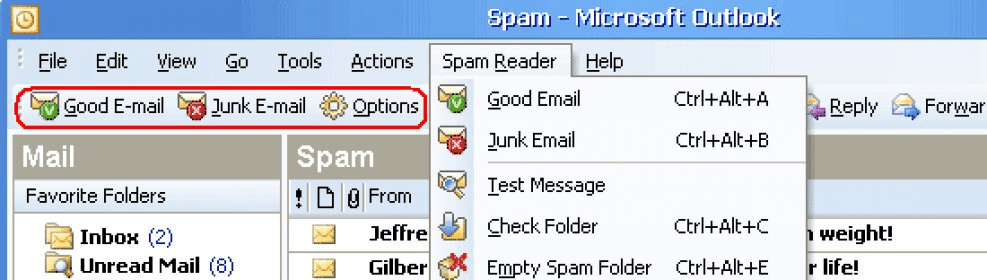
Spam Reader is an anti-spam add-in for Microsoft Outlook, intended for people who want to reduce the amount of junk mail they sort through manually. It uses Bayesian filtering to examine incoming messages and identify patterns commonly associated with spam. Its controls are available in a dedicated Outlook tab, while an options area is used to configure the mailboxes it monitors.
When a message arrives, Spam Reader analyzes its text and compares it with learned spam characteristics and a database of known spam messages. Messages classified as junk are moved to the spam folder and marked as read, keeping them apart from ordinary inbox mail. The Bayesian approach considers message content rather than relying only on a fixed list of blocked senders, and the filter can refine its decisions as it processes messages over time.
Users can guide that learning by indicating whether a message, or similar messages, should be treated as spam. These corrections help the filter distinguish unwanted mail from legitimate correspondence. A whitelist provides another safeguard: addresses added to it are exempt from spam marking, even when a message contains wording that might otherwise trigger the filter. This can help protect regular contacts from being caught by the screening process.
Spam Reader can monitor multiple mailboxes when they are added through its options. The combination of automatic message analysis, user-defined corrections and trusted-address exceptions is suited to people who handle regular email in Outlook and want to spend less time sorting junk while retaining control over filtering decisions. Users can review messages in the spam folder and adjust the rules when legitimate mail is misclassified.
The software integrates with Outlook rather than acting as a separate email client. It is trialware and is offered for Windows 10 and Windows 11, as well as Windows 7 and Windows 8, in 32-bit and 64-bit editions. Outlook is required to use its add-in features. Because filtering depends partly on message patterns and user feedback, reviewing the spam folder and maintaining the whitelist and custom rules can help keep the filter aligned with personal email habits.