FCorp - File & Folder Launcher
... the download page for FCorp - File & Folder Launcher, an innovative software developed by Fahmy Corporation. Designed exclusively for Windows 10, this powerful tool revolutionizes the way you access ...

Start Menu 10 is a freeware alternative to the Windows 10 Start menu. It builds a smart list from frequently used and recently launched applications, and provides quick access to recent documents and folders. Users can add applications, personal folders or any of 25 system folders to a customizable list, then arrange items in virtual groups for one-click launching. A delayed-shutdown timer is also included.
| Author: | OrdinarySoft |
| License: | Freeware |
| Price: | FREE |
| Released: | Mar 3, 2022 |
| File size: | 14.05 MB |
| Downloads: | 1959 |
| Keywords: | start menu replacement, Windows 10 customization, custom start menu, delayed shutdown timer, alternative menu, Windows 10, Start10, windows 10 start menu, user-friendly navigation, windows, Start Menu 10, windows start menu 10, OrdinarySoft, intuitive interface, recent apps menu, windows start menu alternative, advanced search features, windows 7, windows 8, folder launcher |
| Author URL: | https://www.ordinarysoft.com/ |
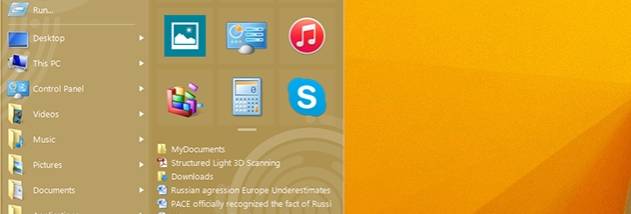

Start Menu 10 is a freeware alternative to the Windows 10 Start menu from OrdinarySoft. It is intended for people who want a menu centered on launching applications and reaching folders, rather than relying on the standard menu layout. Its contents combine automatically gathered shortcuts with items users choose themselves, making it useful both for finding frequently opened programs and for keeping less commonly used locations close at hand.
The menu builds a smart list from applications used most often and those launched recently. This gives frequently needed programs a prominent place, while the recent-apps portion can help locate a program opened only a short time ago. Start Menu 10 also provides quick access to recently used documents and folders, reducing the need to browse through File Explorer or remember where a file was stored. These lists are intended to make the menu reflect day-to-day activity rather than remain a fixed set of shortcuts.
For a more personal layout, users can add folders and applications to a customizable list. The menu supports shortcuts to any of 25 system folders as well as folders chosen by the user, so commonly visited parts of the computer can be opened directly. Virtual groups help organize menu items into categories, and one-click launch lets a grouped item be started without navigating through additional menu levels. This combination suits people who use the same set of tools and locations regularly but want to arrange access around their own workflow.
A timer-based delayed-shutdown feature adds a basic power-management option alongside the menu tools. It can be useful when a computer needs to shut down after a task or period of unattended use. Together, the recent-item lists, custom shortcuts, virtual groups and shutdown timer cover everyday navigation and a simple scheduled action without requiring a separate launcher for those tasks.
Start Menu 10 is freeware and is intended for Windows, including Windows 10. The stated system requirement is 20 MB of hard-drive space. It supports multiple interface languages, including English, Arabic, Chinese, French, German, Italian, Japanese and Korean. Its focus is the Start menu itself: it provides an alternative way to organize and reach applications, documents and folders, while users can continue to open and manage those items with their existing Windows programs.