Switch Off for Windows 10 - Full description
Switch Off is a lightweight Windows utility for scheduling routine computer and session tasks. It is intended for people who want shutdown, restart, log-off, workstation locking or connection disconnection to happen automatically, as well as users who need quick access to these actions from the system tray. Its compact interface makes one-time and recurring operations accessible without requiring a larger system-management suite.
Tasks can be triggered in several ways: after a countdown, at a daily or weekly time, at an exact date and time, when the computer has been idle, or when the system starts or a user logs on. This range supports both simple timers and event-based routines. For example, a countdown can shut down a computer after a task finishes, while a weekly schedule can handle a regular maintenance window. A snooze button allows a scheduled action to be postponed when it is not convenient to run immediately.
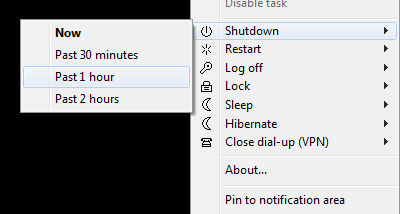
Available actions include shutting down or restarting the computer, logging off the current user, locking the workstation and disconnecting dial-up or VPN connections. Switch Off can also run predefined scripts, and command-line support lets users invoke operations from scripts or other workflows. The system-tray icon provides a direct way to start actions, while the password-protected web interface enables remote control through a browser on another computer or mobile device. A power-saving calculator offers an additional way to consider the effect of scheduled shutdowns.
The utility can be useful on personal computers that should power down after unattended work, shared workstations that need regular locking, or systems where a connection must be disconnected on a schedule. Multi-language support, a Vista and Windows 7-style interface, and Windows User Account Control support address everyday desktop use. The program can run without installation, and a silent-install option is available for managed setups. Its small footprint and lack of additional library or framework requirements keep setup straightforward.
Switch Off is freeware. The supplied compatibility information covers Windows 2000, Windows Server 2003, Windows XP, Windows Vista, Windows 7 and Windows 8, including 64-bit editions where indicated; native 64-bit support is also included. It is designed for Windows rather than as a general remote-administration platform, and its browser-based controls are protected by a password.