UltraMon 64-bit
UltraMon is a Windows utility for people who use ... limits of standard window controls. For managing open applications, UltraMon adds taskbars to secondary monitors on Windows 7 ...

UltraMon adds window controls and display-management tools for Windows multi-monitor setups. It can move or maximize windows across screens, extend taskbar features, save display profiles, manage multi-screen wallpapers and mirror a monitor or individual application for presentations. It also includes tools for arranging large monitor configurations.
| Author: | Christian Studer |
| License: | Trialware |
| Price: | $39.95 |
| Released: | Oct 4, 2018 |
| File size: | 2.30 MB |
| Downloads: | 471 |
| Keywords: | virtual, UltraMon software, Windows 10 compatibility, multi-monitor utility, multiple desktop tool, Christian Studer, multiple monitor taskbar, Screen customization, Multi-monitor management, multi monitor wallpaper, Taskbar extension, multi-monitor, multi monitor utility, move windows between monitors, mirror application display, multi-monitor tool, monitor display profiles, monitor |
| Author URL: | https://www.realtimesoft.com/ |

UltraMon is a Windows utility for people who work with two or more monitors and need more control over window placement, taskbars and display settings. It adds multi-monitor functions to the desktop, helping users keep applications organized across screens and configure displays for different tasks.
Window controls make it possible to move an application to another monitor or maximize it across the desktop using buttons added to its title bar. UltraMon also adds controls to shortcut properties, where users can set an application's starting position and choose custom display settings for when it runs. These options are useful for keeping frequently used programs on a preferred screen, including when applications are launched from shortcuts.
Taskbar behavior depends on the Windows version. On Windows 8 and later, UltraMon extends the built-in multi-monitor taskbar with additional features. On Windows 7 and earlier, it can add a taskbar to each secondary monitor; each bar shows applications running on that screen. This helps users with many open programs see where a task is located and choose the correct window when switching between applications.
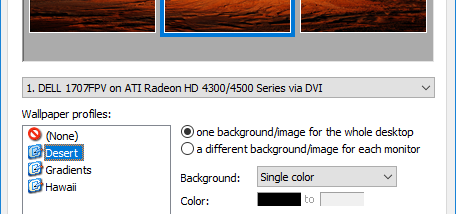
Display profiles store settings for one or more monitors, so a group of screens can be reconfigured without adjusting each display individually. Profiles can also be applied at login, which is useful on shared computers where different users prefer different arrangements. The wallpaper manager supports a separate image for each monitor or one image stretched across the full desktop. For presentations, UltraMon can mirror the primary display to secondary screens, or mirror a single application window. It can also blank secondary monitors while a screen saver runs or run additional screen savers on those displays.
UltraMon includes tools for arranging multiple monitors and a custom Display Settings applet that supports configurations with more than ten monitors. It is intended for Windows multi-display setups and supports Windows 10. The software is distributed as trialware; its features are most relevant to users who regularly move between screens, manage many open applications, give presentations or need to switch among saved display layouts.