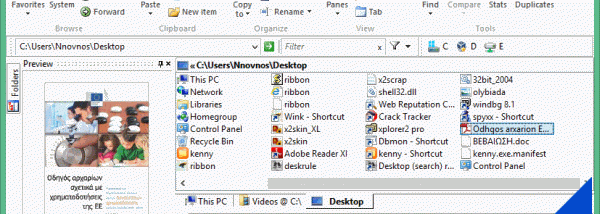
xplorer² x64 for Windows 10 - Full description
xplorer² x64 is a 64-bit file manager for users who handle many folders and files and want a more structured alternative to navigating one Windows Explorer window at a time. Its dual-pane layout displays two locations side by side, while tabs keep additional folders available in the same workspace. The interface is customizable and designed to retain familiar Windows shell behavior alongside tools for more involved file operations.
The two panes make copying, moving, comparing and synchronizing folder contents easier to manage: each side can show a different location, so files can be transferred or differences reviewed without repeatedly opening and closing windows. Tabs allow several working folders to stay open, and visual filtering and selection tools help narrow down large file lists. For searches, Omni-Finder uses filters that can include file details and comments, helping locate items by more than their names. The program can also identify duplicate files for review and cleanup.
Common file operations include copying, deleting, renaming and bulk renaming, as well as splitting and joining large files. Secure deletion is available when files need to be shredded rather than simply removed. Advanced NTFS tools support hard links and file comments, while folder junctions can help reorganize folder structures. The manager can access network resources and work with virtual folders such as FTP, web and ZIP locations. Additional file details include information such as MP3 tags and checksums, and an instant preview can display text, images and audio or video content.
For repetitive work, xplorer² can run text commands or DOS scripts on selected files. Keyboard shortcuts, histories and autocomplete support faster navigation, and file information can be exported as text for printing or reference. Unicode and text-encoding awareness helps when working with files in different languages or formats. These tools suit everyday organizing as well as tasks such as comparing project folders, finding duplicate downloads, processing batches of files and transferring data across locations.
xplorer² x64 is trialware and is intended for 64-bit Windows systems. Its compact design combines file browsing, search and maintenance tools in one application, so users can move between routine folder management and more specialized operations without switching utilities. The program is suited to people who prefer a two-pane workflow and need detailed control over file selection and transfers.