OllyDbg
OllyDbg is a 32-bit assembler-level debugger for Microsoft Windows, intended for developers and analysts ... memory can be scanned for binary sequences. The debugger can also load DLLs directly and locate routines ...

Adobe Flash Player Debugger is a development utility for troubleshooting Adobe Flash and Flex projects. It lets developers set breakpoints, control application execution, monitor variables, and evaluate expressions while content runs. These tools help pinpoint errors and inspect program state alongside compatible Adobe development tools. Flash Player is discontinued, so the debugger is mainly suited to isolated legacy projects.
| Author: | Adobe Systems |
| License: | Freeware |
| Price: | FREE |
| Released: | Dec 8, 2020 |
| File size: | 20.50 MB |
| Downloads: | 1040 |
| Keywords: | debug flex applications, Adobe Flash Player Debugger, debugging tool, Flash, multimedia content debugger, x64 software, Debugger, flash breakpoints, Flash Player, flash projector, Windows 10 compatible, Debug Flash, Player, monitor flash variables, flash debugging tool, Adobe Systems, flash player debugger, Flash Debugger |
| Author URL: | https://www.adobe.com/ |
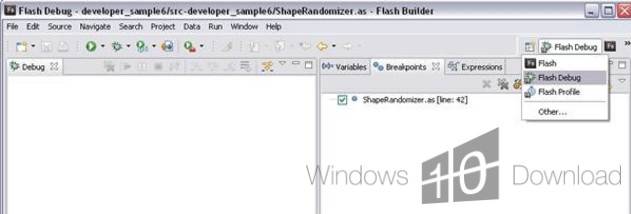

Adobe Flash Player Debugger is a development utility for working with Adobe Flash and Flex projects. It helps developers investigate problems that arise while a project is running by exposing execution details and tools for examining code behavior. Unlike a standard player intended mainly for viewing Flash content, the debugger is aimed at development and troubleshooting workflows.
During a debugging session, developers can set code breakpoints to pause execution at selected points and inspect what the application is doing. Execution controls make it possible to step through code or resume the application after a pause, helping isolate the point where an error occurs. The debugger can also monitor selected variables as their values change and evaluate expressions while the project is running. These features are useful for checking assumptions about program state without relying only on repeated builds or visible output.
The utility can collect debugging information to help diagnose errors in Flash projects and Flex applications. Developers can use it alongside supported Adobe authoring tools, including Flash Builder, Flash Catalyst, and Flash Professional, to test content during development. Adobe also provided standalone projector builds, which can open Flash content outside a browser for testing. The debugger's inspection and execution controls support a more deliberate workflow: reproduce an issue, pause at relevant code, examine variables or expressions, and continue execution to see how the application responds.
Typical uses include tracking down unexpected behavior, locating the code path that triggers an error, and checking how data changes during a running application. It is intended for developers maintaining or testing legacy Flash content rather than for everyday web browsing. Flash Player is discontinued: Adobe ended support at the end of 2020, and modern browsers no longer support its plug-in. That makes the debugger relevant chiefly to isolated legacy development or archival work, not to running Flash content on the open web.
The software was distributed as freeware for Windows, with support listed for Windows XP through Windows 10. The package size is about 20 MB. Its usefulness depends on having a compatible Flash or Flex project and development environment; it does not replace a source-code editor or authoring application. Because Flash Player is no longer supported, working with legacy projects should be done cautiously and in a controlled environment.