
AlaTimer

AlaTimer 5.1.0

Daily computer-use limits for children

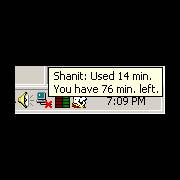
AlaTimer helps parents set a daily computer-use allowance for each child's Windows account. It tracks time separately by user and shows time used and remaining when the mouse hovers over Fred Flintstone's icon. A warning appears 60 seconds before the limit ends, and parents can set the computer to log off, shut down, or restart when the allowance expires.

AlaTimer 5.1.0 details

Author:
License: Trialware
Price: $12.00
Released:
File size: 1.20 MB
Downloads: 216
Keywords: daily pc time limit, child computer usage, computer usage control, Screen Time Management, limiter, parental control timer, parental timer, computer usage, parental control, limit computer usage, Windows 10, User-friendly Interface, computer time limit, Parental Control, computer usage limiter, Shanit, parental, AlaTimer
Author URL: https://www.shanit.com/
AlaTimer screenshot
AlaTimerClocks & AlarmsWindows XP, Windows Vista, Windows Vista x64, Windows 7, Windows 7 x64, Windows 8, Windows 8 x64, Windows 10, Windows 10 x64

User Rating: 3.0 (1 vote)

Windows 10

x32

Windows 10

x64

AlaTimer Awards

Windows 10 download editor's pick

AlaTimer for Windows 10 - Full description

AlaTimer is a computer-use timer for parents who want to set daily limits for children using separate Windows accounts. Each child's account can have its own maximum usage time for a calendar day, such as a two-hour allowance. The timer tracks use by Windows user, making the limits personal rather than shared across siblings.

When a parent configures an account, AlaTimer applies its daily allowance and monitors how much of it has been used. Hovering the mouse over Fred Flintstone's icon displays a short status message with the time already spent at the computer and the remaining time for that day. This gives the child a quick way to check the limit without opening a separate reporting screen.

AlaTimer can show a warning message 60 seconds before the allowance expires, prompting the child to log off. Parents can choose what happens when time runs out: the program can log off the current user, shut down the computer, or restart it. These options let a household decide whether to end the child's session or close the computer entirely.

The per-account timers are intended to make everyday computer routines easier to manage, particularly in households where children share a PC and need different limits. Rather than relying on reminders or negotiating whose turn it is, parents can configure a set amount of time and let the program monitor it. The status message also helps children see how much time remains before the session ends.

AlaTimer is trialware from Shanit. It is intended for Windows computers, with compatibility information covering Windows versions through Windows 10. Parents should configure the relevant child accounts and choose the end-of-session action to match their household's needs.

AlaTimer for Windows 10 - Post your review