
Free Virtual Keyboard

Free Virtual Keyboard 6.0

Virtual on-screen keyboard for data entry

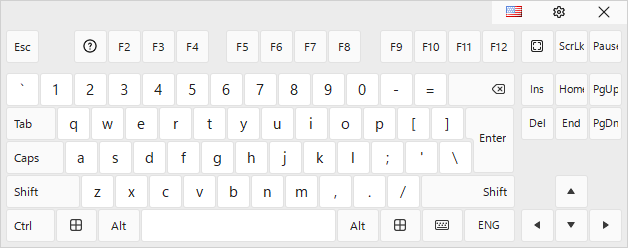
Free Virtual Keyboard is an on-screen keyboard for UMPCs with passive touchscreens, letting users enter data and reply to emails. Version 6.0 is freeware for Windows 7, 8, 10, 11 (32/64-bit). It is portable, needs no installation, leaves no Registry traces, and can be copied to USB. It offers full-screen mode, transparency slider, color/type changes, key repeating, screen-width scaling, movable, resizable keyboard. Pressed keys go to active app.

Free Virtual Keyboard 6.0 details

Author:
License: Freeware
Price: FREE
Released:
File size: 2.00 MB
Downloads: 4
Keywords: Free Virtual Keyboard, download Free Virtual Keyboard, Free Virtual Keyboard free download, on-screen keyboard, transparent keyboard, virtual keyboard, keyboard, type, write, letter, portable software, freeware, Windows, touchscreen input
Author URL: https://www.comfortsoftware.com/
Free Virtual Keyboard screenshot
Free Virtual KeyboardOtherWindows 11, Windows 10 32/64 bit, Windows 8 32/64 bit, Windows 7 32/64 bit

User Rating: 0 (0 votes)

Free Virtual Keyboard for Windows 10 - Full description

Free Virtual Keyboard is a virtual on-screen keyboard developed by Comfort Software Group. It is intended for users who work on UMPCs with a passive touchscreen, enabling them to reply to emails or enter data. It runs on Windows 11, Windows 10 (32/64 bit), Windows 8 (32/64 bit), and Windows 7 (32/64 bit). Version 6.0 is freeware. The program is portable and does not require installation. It leaves no traces in the Windows Registry and can be copied to a USB flash drive or other devices. The keyboard can be switched to full screen mode. A built-in slider selects the transparency level. Users can change the color and type of the virtual keyboard. Key repeating mode can be enabled. The keyboard can be scaled to match the screen width. It can be moved to any area of the screen and its size adjusted. Pressed keys are sent to the active application, such as an email client, web page, or word processor, like a standard computer keyboard. During testing, no errors occurred, and the program remained light on system resources without affecting overall computer performance. It can be used by beginners and experts.

Free Virtual Keyboard for Windows 10 - Post your review