Monday
... "Monday" developed by monday.com. Monday is a powerful project management tool that helps teams collaborate, organize tasks, and track progress all in one place. With Monday, ...

Alternate Timer records work hours and other activities, such as internet use, in monthly timetables. It supports live tracking with a stopwatch-style workflow or retrospective entry after an activity. Monthly files can be saved automatically or through user-defined settings, then combined into an overview document covering several months, such as half a year or a year.
| Author: | AlternateTools |
| License: | Freeware |
| Price: | FREE |
| Released: | Oct 29, 2026 |
| File size: | 2.20 MB |
| Downloads: | 439 |
| Keywords: | AlternateTools, schedule, overview table, time tracking, activity timer, work time tracker, timetable, work time regulation, timer, project management, monthly timesheet, Alternate Timer, software review, internet usage time log, time work, work schedule tracker, time tracking overview, time table |
| Author URL: | https://www.alternate-tools.com/pages/c_main.php?lang=ENG |
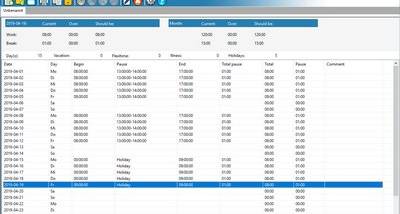

Alternate Timer is a time-recording program for people who need to keep track of working hours or other activities, such as internet use. It organizes records in monthly timetables, making it suitable for routine daily logging as well as entering time after an activity has taken place. The monthly structure gives each period its own record while allowing information to be collected across longer spans.
For live tracking, the program works like a stopwatch: users can record an activity as it happens, for example during a workday. This approach is useful when time should be logged as tasks begin and end rather than reconstructed later. The same timetable can also be edited retrospectively, so offline use supports entering or correcting time settings after the activity is over. These two workflows let the program serve both people who track time continuously and those who maintain records in batches.
Alternate Timer saves one or more files for each month, either automatically or according to user-defined file settings. Separate monthly files keep records organized and can be used as individual period reports. The program can also combine several month files into an overview document, bringing multiple periods together for a broader summary, such as half a year or a full year. This is useful for reviewing accumulated work time or comparing activity across months without treating each monthly timetable as an isolated record.
Typical uses include maintaining a personal work schedule, recording hours for later review, and monitoring recurring activities such as daily internet use. Monthly records provide a practical basis for checking time across the year; the overview document helps when a longer reporting period is more useful than a single month. The program records and organizes timing information, rather than requiring every entry to be made in real time.
Alternate Timer is freeware from AlternateTools and is available for Windows 10 and Windows 11, including 32-bit and 64-bit Windows 10 systems. It also supports a range of older Windows desktop and Windows Server editions. Its core workflow is based on monthly timetables, saved files, and combined overview documents, so it can be used for either live tracking or later time entry.