KNN-WG
... KNN-WG software, developed by the renowned AgriMetSoft. This Windows 10 compatible software is a powerful tool designed for the generation of daily weather data for ...

AstroPlanner helps amateur astronomers plan visual observing sessions, check target visibility and keep observation logs. It builds object lists from built-in catalogues, manual entries or imported files, then calculates visibility and rise, transit and set times for a chosen site. Telescope and eyepiece settings provide magnification and field-of-view calculations, while charts show the current sky area. The software can also slew compatible telescopes and supports alignment tools.
| Author: | iLanga, Inc. |
| License: | Demo |
| Price: | $45.00 |
| Released: | Oct 15, 2020 |
| File size: | 81.00 MB |
| Downloads: | 260 |
| Keywords: | controller, logger, Windows 10, telescope control software, iLanga Inc., telescope alignment tool, log astronomical observation, AstroPlanner, astronomy star chart, plan astronomical observation, x64 software, astronomical observations, star mapping, astronomy planning, planner, astronomy observing planner, astronomical observation log, observing list planner |
| Author URL: | http://www.ilangainc.com/ |
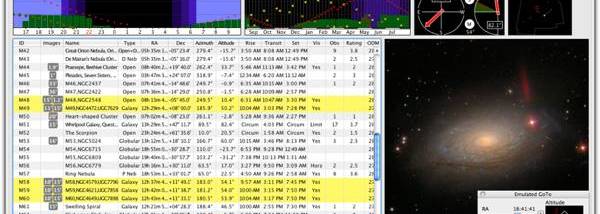

AstroPlanner is an astronomy planning and observing log application for amateur astronomers who want to prepare observing lists, check which targets are visible, and record sessions. It can also control compatible computer-connected telescopes and mounts, combining observing preparation with practical tools for operating equipment at the telescope.
Observers can build target lists by entering objects manually, searching built-in astronomical catalogues such as Messier, NGC and SAO, or importing suitably formatted text files. Solar system targets include the Sun, Moon, planets, comets and minor planets; orbital elements for comets and minor planets can be imported in standard formats. For a planned session, AstroPlanner uses the observing time and site details, including horizon obstructions, to calculate which objects are above the horizon. Rise, transit and set times help arrange targets through the night, while additional calculations provide observing parameters such as optimal detection magnification.
When an object is observed, users can record one or more observations and add notes. Equipment can be selected from user-defined telescope and eyepiece lists, allowing the software to calculate effective focal length, magnification and field of view for the setup. A star chart displays the telescope's field of view for comparison with the view through the eyepiece. Charts can plot catalogue objects, including stars from the Tycho catalogue, and an internet connection enables downloads of Digital Sky Survey images for field comparison. The software also supports plotting from the USNO A2.0 catalogue and the online USNO B1.0 catalogue.
For equipment control, AstroPlanner supports a range of systems, including Meade telescopes using LX200, LX200GPS or Autostar controllers, Celestron NexStar scopes, Astro-Physics GTO mounts and Vixen SkySensor 2000. Users can slew a connected telescope to a selected target. Best Pair helps choose alignment stars, while computer-guided tools assist with iterative and drift polar alignment. An all-sky view shows the horizon-to-horizon sky, with object and alignment-star positions, providing a broader view alongside the detailed field chart.
AstroPlanner is offered as demo software for Windows, with the supplied platform information covering Windows 7, Windows 8 and Windows 10, including their 64-bit editions. It is also available for Macintosh, although the voice-command mode is Macintosh-only. The combination of target selection, visibility calculations, charts, equipment calculations and logging suits observers who want to plan a session at a computer and carry the same records into telescope use.