RSIGuard
Welcome to the download page for RSIGuard, an exceptional Windows 10 software developed by Remedy Interactive. Designed to combat the growing issue of repetitive strain injuries ...

AutoClick is a lightweight Windows utility for automating repeated mouse clicks during games or routine work. A designated hotkey starts the clicking, reducing the need to press the mouse button by hand. Its focused workflow suits simple repetitive tasks rather than complex macros. The freeware supports Windows versions through Windows 10.
| Author: | GoldenSoft |
| License: | Freeware |
| Price: | FREE |
| Released: | May 24, 2016 |
| File size: | 543 kB |
| Downloads: | 196 |
| Keywords: | tool, mouse, automatic mouse clicker, user-friendly interface, hotkey clicker, GoldenSoft, repetitive clicking tool, mouse click automation, x64 software, Mouse Software, game, automatic clicking, auto clicker, AutoClick Clicker, Mouse Utility, free auto clicker, click, Windows 10, hotkey, AutoClick |
| Author URL: | http://goldensoft.org/ |
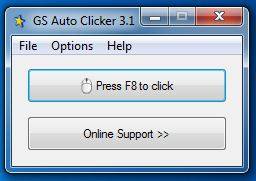

AutoClick is a lightweight Windows utility that automates mouse clicks for people who repeatedly click while gaming or working. Instead of pressing the mouse button by hand for each action, the user starts clicking with a designated hotkey. This can reduce repetitive finger movement during tasks where the same click is needed many times.
The central feature is hotkey-controlled clicking. After choosing the specific hotkey used by the program, the user can activate AutoClick when clicking is needed and stop relying on repeated manual presses. The hotkey approach is useful when the mouse hand needs a break or when repeated input is part of a routine task. The supplied feature information does not establish additional controls such as click intervals, button selection, or click locations, so AutoClick is best understood as a simple click-automation tool.
Its narrow focus keeps the workflow straightforward: run the utility, use its hotkey to trigger automated clicking, and return to manual input when automation is no longer needed. It does not replace a full macro editor or describe sequences of keyboard and mouse actions. This makes it suited to users looking for a basic way to automate repeated mouse clicks rather than a configurable system for scripting complex actions.
Typical uses include repetitive clicking during games and routine computer work. Automation may be convenient when a task demands frequent repeated presses, though it is not appropriate where each click requires a decision or careful targeting. Users should also consider the rules of any game or service before using automated input, since permitted tools vary by application.
AutoClick is freeware for Windows, with support stated for Windows versions through Windows 10. Some antivirus or antispyware programs may flag the application; such a detection can be a false positive, but users should review security warnings and obtain the program from a trusted source. Its small download size makes it a compact option for basic mouse-click automation.