SSuite Desktop Search Engine
Welcome to the home of SSuite Desktop Search Engine, a top-tier product developed by the renowned ... TM. This software is a must-have for every Windows 10 user seeking to streamline their desktop navigation ...

Ingenious Search brings file and email search, content organization and PDF tools into one Windows workspace. Narrow results with detailed criteria, sorting and folder exclusions, then check files in the built-in preview. Search indexed Gmail or Classic Outlook messages, or describe a query using voice. It can organize copies of supported photos and documents while preserving originals, and fill PDF forms using reviewed suggestions and locally saved answers.
| Author: | Ingenious, LLC |
| License: | Freeware |
| Price: | FREE |
| Released: | Oct 28, 2026 |
| File size: | 86.51 MB |
| Downloads: | 319 |
| Keywords: | photo organizer, desktop search, email search tool, content organizer, document organizer, desktop file search, local AI, PDF forms, local ai search, pdf form filler, voice search, email search, Windows, file search |
| Author URL: | https://ingenioustools.net |
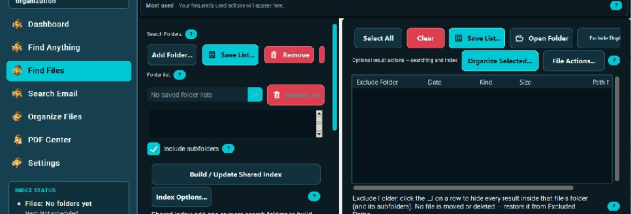
Ingenious Search is a Windows desktop search and organization app for people who need to find files, email and information inside documents without relying on exact filenames. It combines file and email search with tools for organizing folders and working with PDF forms. Searches can be narrowed using detailed criteria, sorting and folder exclusions, while a built-in preview helps check results before opening them. A voice interface lets users describe a search aloud.
For email searches, Ingenious Search indexes supported messages so queries can reveal relevant content beyond simple keyword matches. Email search requires a connected Gmail account or Classic Outlook; Outlook integration does not support the newer Outlook app. Indexing can be started manually or scheduled, letting users choose when the app updates its searchable information. Results can then be reviewed alongside file matches in the same workspace.
The organization tools analyze supported photos and documents in a folder, suggest descriptive filenames and nested folders, and organize copies while leaving originals intact. Users can review the proposed structure before applying it, which makes the workflow suitable for sorting a large collection without immediately changing source files. The PDF tools include an editor that can create fillable fields from supported scanned PDFs and reuse locally saved answers approved for personal or business forms. Suggested answers and detected fields should be checked before saving. A separate PDF viewer previews and prints documents without launching the full editor.
Local AI handles supported tasks on the PC after its model is downloaded. The model needs additional memory and storage beyond the app's 4 GB RAM requirement. For selected difficult tasks, an optional separately available Ingenious Premium service uses cloud AI; content and action costs require approval. Typical uses include locating an old document, finding an email, sorting photos or paperwork, and filling recurring PDF forms.
Ingenious Search is freeware for 64-bit Windows 10 and Windows 11, with English, French, German, Spanish and Simplified Chinese interfaces. Free use does not require registration and does not expire, but daily allowances apply: three completed searches, one organization operation, two PDF editing sessions and 20 dedicated PDF viewing sessions. Allowances reset at local midnight. Free updates and a support channel are included. Internet access is needed for downloads, connected email and optional managed AI.