ClassifyIt_Basic
... to the download page for ClassifyIt_Basic, a remarkable Windows 10 software developed by the talented Ralf Ulrich Garbe. ClassifyIt_Basic is a powerful tool designed to ...

AutoKrypt automates file and folder encryption through a graphical interface, without requiring scripts. It supports password, secret-key, public/private-key and OpenPGP operations, including signing and verification. Tasks can process folder trees, select files by name or timestamp, back up results, and run on a schedule. Task chains, file monitors, variables, email notifications and command-line controls support broader workflows.
| Author: | Hitek Software LLC |
| License: | Trialware |
| Price: | $149.95 |
| Released: | Jun 20, 2024 |
| File size: | 52.70 MB |
| Downloads: | 557 |
| Keywords: | x64 application, encrypt, data encryption, Hitek Software LLC, Windows 10 software, scheduled encryption tasks, encryptor, decrypt folder, secure file transfer, file decryption software, decrypt, file encryption automation, openpgp encryption tool, folder encryption software, AutoKrypt, encrypt file, generate key, automated backup encryption |
| Author URL: | http://www.hiteksoftware.com |
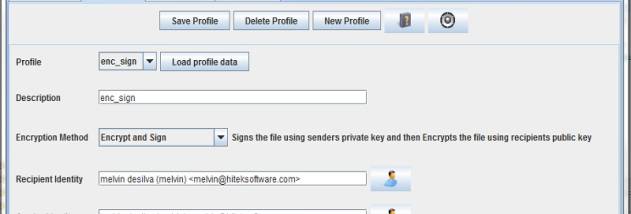

AutoKrypt is file and folder encryption software for people who need to automate routine data-protection tasks without writing scripts. It combines a graphical interface for configuring encryption jobs with scheduling and monitoring tools, so recurring work can run in the background. Users create profiles for encryption methods and apply those profiles to tasks that encrypt, decrypt, sign or verify files.
The available methods include password-based encryption, secret-key encryption, and public- and private-key encryption. OpenPGP is supported for password and key-based operations, including signing and verification. Profiles let users save the settings for a method and reuse them across tasks instead of configuring each job from scratch. Tasks can select files by filename or timestamp, and can process files throughout an entire folder tree. This is useful for applying consistent rules to incoming files or regularly updating an archive.
AutoKrypt can back up both the original files and the encrypted or decrypted results to other folders. It can also rename processed files using regular expressions, which helps organize outputs or match naming conventions used by other systems. Dynamic variables allow information produced by one task to be used in another. Directory and file monitors, task chains and these variables can be combined to build workflows that react to changes and pass work between steps. Email notifications can report task outcomes according to exit codes.
The scheduler can run encryption tasks at chosen times and launch other programs or applications as part of a workflow. For command-line use, its Task Runner can start configured tasks from another program; a separate command-line module can control the software remotely over SSH. The background task engine can also run as a Windows service, allowing jobs to operate without an interactive desktop session. These options suit automated backups, routine file transfers and other repeated processes where encryption needs to happen reliably without manual intervention.
AutoKrypt is commercial trialware with a 30-day trial. Its encryption module uses GnuPG, and the software is intended for Windows systems, with Windows 10 among the supported editions. The graphical setup does not require programming or scripting knowledge, while command-line and service options are available for more integrated deployments.