3nity Media Player
... Player, a top-notch software developed by 3nitySoftwares. This Windows 10 compatible software is a versatile multimedia player that caters to all your media needs. It's ...

AutoPlay Express is a visual editor for creating autoplay menus on CD and DVD discs. Its WYSIWYG workspace lets users build layouts without programming, organize content across multiple pages and customize interactive objects. Projects can include slideshows, web pages, video and Flash content. Built-in testing, a virtual disc and a CD/DVD burner support previewing and publishing finished menus.
| Author: | KL Soft |
| License: | Trialware |
| Price: | $59.00 |
| Released: | May 6, 2014 |
| File size: | 8.40 MB |
| Downloads: | 442 |
| Keywords: | autorun menu designer, x64 software, Windows 10 compatible, interactive menu creation, dvd menu software, create shell, multimedia authoring tool, AutoPlay, cd menu creator, shell, autoplay menu maker, create autoplay menu, cd dvd authoring, disc presentation tool, create presentation, AutoPlay Express, KL Soft, presentation |
| Author URL: | http://www.kl-soft.com |
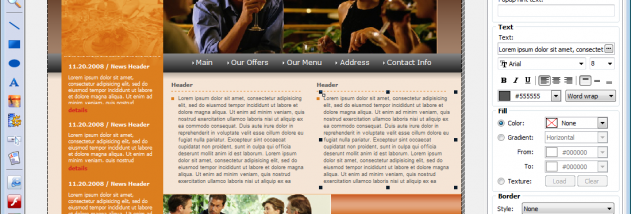

AutoPlay Express is a visual authoring tool for building autoplay menus that launch from CD and DVD discs. It is intended for people preparing photo collections, software or product catalogues, presentations, promotional materials and business-card discs, including users without Windows programming experience. A WYSIWYG workspace shows the menu as it is assembled, so designers can arrange its interface visually and preview the result without writing code.
Projects can contain multiple pages, allowing content to be divided into clear sections instead of crowded onto one screen. This suits discs with extensive catalogues or several kinds of information. The editor provides customizable interface objects whose shapes, colours, borders and fonts can be adjusted. Interactive states can change an object's appearance when the pointer moves over it, supporting visual feedback such as highlighted text, underlined links, tooltips and dynamic menus. Objects can also trigger actions when clicked, making the menu a practical way to launch content or navigate a presentation.
The menus can combine presentation elements such as slideshows with embedded web pages, video and Flash content. AutoPlay Express includes tools to test a project and publish its finished front end, as well as a virtual disc for checking how the menu behaves before it is written to physical media. A built-in CD/DVD burner supports the process of preparing a disc from within the same application, from an initial project through to a final master disc.
Typical uses include distributing event photos, organizing a disc-based catalogue, presenting company information, or providing a launch screen for media and documents. Its page-based structure and customizable interactive objects help organize larger projects, while the visual editor keeps the work focused on layout and behavior rather than programming. The workflow is designed around CD and DVD distribution, so it is most relevant to projects intended for optical discs rather than modern web or cloud delivery.
AutoPlay Express is trialware from KL Soft. The supplied system information lists Windows XP, Vista, 7 and 8; it does not list Windows 10 or 11. The application's stated purpose is creating and publishing autoplay interfaces for CD and DVD media.