Replay Video Capture
Welcome to the download page for Replay Video Capture, an exceptional software developed by Applian LLC, designed exclusively for Windows 10 users. With Replay Video Capture, you can effortlessly capture and record any video ...

Blue Iris is Windows software for monitoring and managing multiple security cameras from one interface. It accepts network IP, USB and analog camera connections, displays feeds together, and supports motion-triggered recording, optional audio capture and configurable recording settings. Users can browse saved footage on a timeline and set alerts by email, message, phone call or loudspeaker.
| Author: | Ken Pletzer |
| License: | Trialware |
| Price: | $99.95 |
| Released: | Oct 30, 2026 |
| File size: | 133.00 MB |
| Downloads: | 915 |
| Keywords: | webcam surveillance software, multi camera viewer, surveillance, video surveillance, Blue Iris, video capture, motion detection recording, security camera software, video motion, camera monitoring software, Perspective Software, security camera, video security, webcam, surveillance system, remote management, ip camera recorder, motion detection, security |
| Author URL: | https://blueirissoftware.com/ |
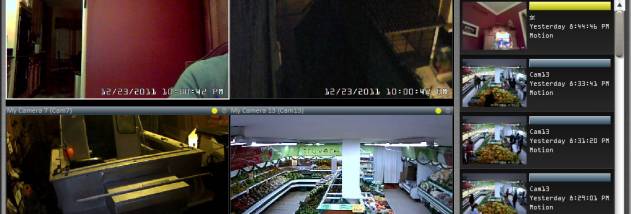

Blue Iris is Windows software for setting up and managing a home or small-site camera system. It brings feeds from multiple cameras into one interface, which can be useful when devices come from different manufacturers or use different connection types. Users can add cameras over a network IP connection, USB or analog input, or import camera settings from a REG file. A camera feed can also be duplicated when another view of the same source is needed.
The main view displays several camera feeds together for live monitoring. Blue Iris can enable motion detection and optionally record audio, while per-camera settings let users adjust recording details such as image format, resolution and de-interlacing. A timeline provides a way to browse saved footage, making it easier to review events without searching through recordings one file at a time. Recording can also be exported automatically when configured triggers occur.
Motion triggers can be tuned to respond to activity that meets chosen conditions. Settings include minimum object size, contrast and the minimum duration of movement, helping distinguish significant motion from minor changes in a scene. When a trigger is activated, Blue Iris can record video or save images. It can also send an alert by email or message, place a phone call, or relay information through a loudspeaker. These options allow the system to react to detected activity without requiring continuous attention to the live view.
Camera profiles and individual device settings support different monitoring arrangements. For example, a household can keep several cameras visible at once, use motion-triggered recording for areas that are usually quiet, and review the resulting clips on the timeline. The same combination of live viewing, configurable capture and alerts can suit users who need to monitor a workspace or another property. The interface concentrates camera feeds and controls in one place, while the range of settings accommodates more tailored recording setups.
Blue Iris is trialware developed by Ken Pletzer for 64-bit Windows 10 and Windows 11. Its camera and recording options make it suited to users who want more control than a single camera's bundled utility may provide. Camera connection methods and available settings depend on the devices being configured; the program supports network IP, USB and analog camera inputs.