Text Filter
Text Filter is a lightweight desktop utility for reading and searching text files. It is suited to people who need ... they are easier to spot in the remaining text. Search behavior can be adjusted to the task. The ...

Brava! Desktop IXL is a document viewer and collaboration tool for professionals handling PDFs, CAD drawings, and image files. It opens files without requiring their native applications and provides markup tools for comments, highlights, and drawing directly on documents. Users can share saved annotations, redact sensitive information, apply digital signatures, and batch convert, print, or publish files. It is suited to document-heavy work in fields such as architecture, engineering, and construction.
| Author: | OpenText Corporation |
| License: | Trialware |
| Price: | FREE |
| Released: | Oct 23, 2025 |
| File size: | 1126.40 MB |
| Downloads: | 200 |
| Keywords: | Text Editor, Image Viewer, image, editor, Brava! Desktop IXL free download, annotation tools, PDF viewing, document viewing, collaboration tools, batch document conversion, Brava! Desktop IXL, secure sharing, text, cad drawing viewer, image file viewer, document viewer, CAD, pdf annotation software, file conversion, Informative Graphics Corp, document redaction tool, file collaboration, document management, user-friendly interface, download Brava! Desktop IXL, CAD analyzer, PDF management |
| Author URL: | https://www.qbssoftware.com/product/brava-desktop/ |


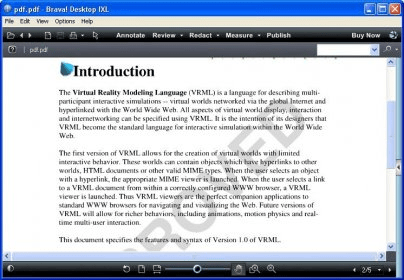

Brava! Desktop IXL is a document viewing and collaboration application for professionals who work with PDFs, CAD drawings, images, and other file types. It lets teams inspect many kinds of documents without opening them in their original authoring applications, which is useful when colleagues need to review files created with different tools. Architecture, engineering, construction, and document-heavy business teams can use it to examine plans and records in one workspace.
The viewing tools provide access to PDFs, CAD drawings, and image files for review. Users can add comments, highlight areas, and draw directly on a document to make feedback specific to a location or detail. Saved annotations can be shared with colleagues, helping reviewers communicate proposed changes without altering the original content. This approach is particularly useful for technical drawings, where a marked-up visual reference can clarify a question more effectively than a separate note.
For documents that contain confidential material, redaction tools permanently remove selected information rather than simply covering it in a view. Digital signatures support document authentication and help identify signed files. Brava! Desktop IXL also includes batch processing for tasks such as converting, printing, and publishing multiple files at once, making routine handling more practical when an organization works with large document sets. Its interface brings these viewing, review, and output tasks together in a single application.
Typical uses include reviewing design drawings, circulating marked-up documents for comment, preparing files for distribution, and processing groups of documents for printing or publishing. Redaction can help teams remove sensitive details before sharing a file, while signatures add an authentication step to document workflows. These tools support review and handling; they do not replace the specialist applications used to create or edit source documents.
Brava! Desktop IXL is trialware for Windows 10 and Windows 11, with support for 32-bit and 64-bit Windows 10 systems. It is developed by OpenText Corporation. Its broad file viewing and batch operations are intended for users who need to review or prepare diverse documents without relying on a separate native application for each format.