Master PDF Editor
... can discover the powerful and versatile software, Master PDF Editor, developed by the innovative Code-Industry Team. Master PDF Editor is a comprehensive solution for creating, editing, ...

PDF Editor lets users revise PDF page contents without rebuilding a document from scratch. Text can be added, deleted, moved or edited in place, while pictures and vector graphics can be selected, copied, pasted and repositioned. It also provides highlighting, underlining, strikeout, stamps, bookmark editing and page management. Users can adjust page size, fill forms on screen, work with encrypted PDFs and export flip-page presentations for websites.
| Author: | CAD-KAS Kassler Computersoftware GbR |
| License: | Demo |
| Price: | $79.00 |
| Released: | Oct 11, 2016 |
| File size: | 8.60 MB |
| Downloads: | 601 |
| Keywords: | add text to pdf, pdf flipbook export, edit pdf images, edit, editor, add text, text editing, modify pdf pages, pdf annotations, convert, image insertion, PDF editor, Windows 10 compatible, document modification, edit pdf text, CAD-KAS PDF Editor, interactive form creation, write annotation |
| Author URL: | http://www.cadkas.com/ |
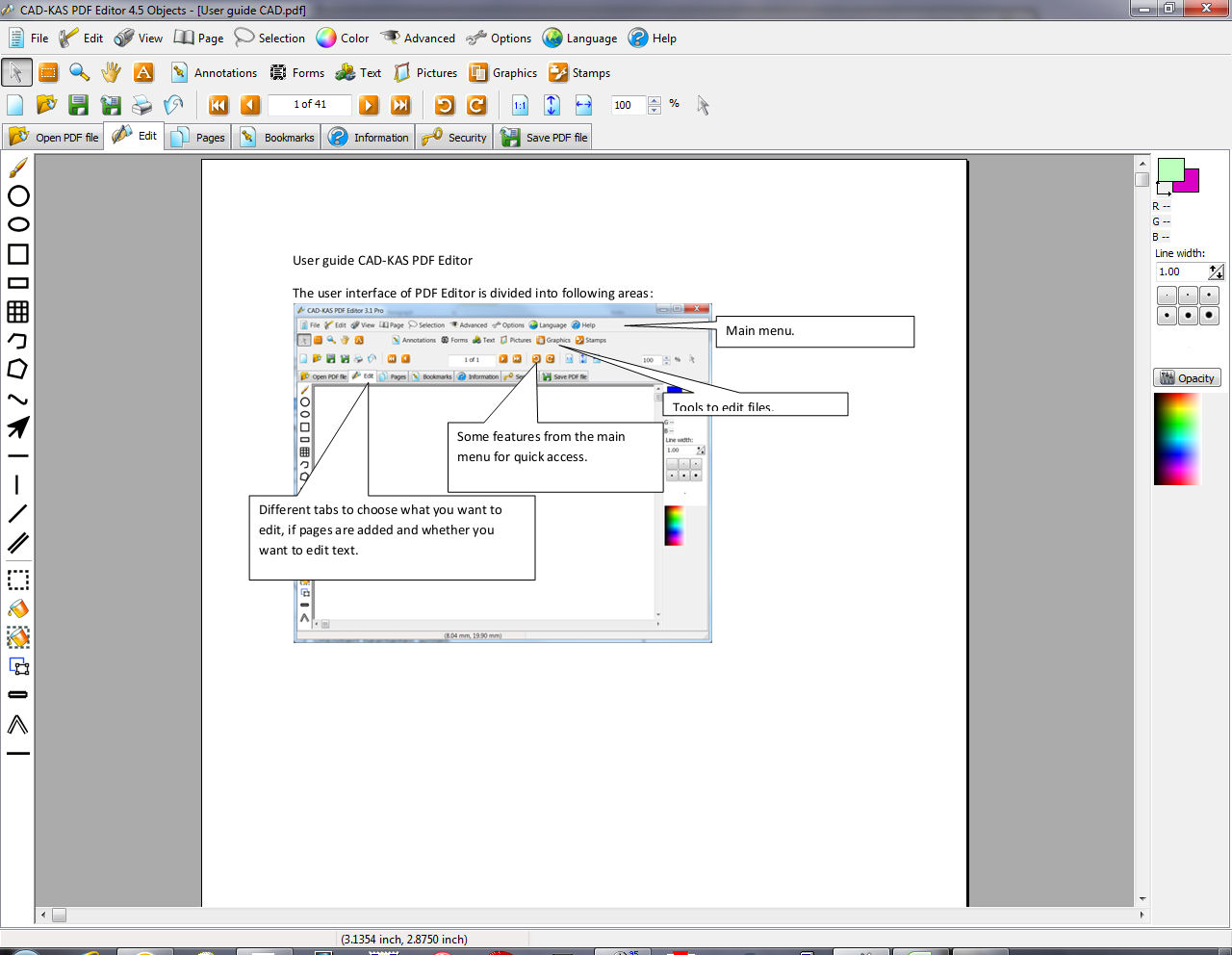

PDF Editor is a desktop tool for changing the contents and layout of PDF documents, aimed at people who need to revise existing files rather than recreate them from scratch. It works with individual page objects, including text, pictures and vector graphics, as well as annotations and page-level settings. This makes it useful for correcting details in a document, adjusting its appearance or preparing a form before printing.
Text can be added in a chosen font, deleted, moved or edited in place. Double-clicking a text object opens it for changes such as correcting a spelling mistake, updating a phone number or replacing wording. The pointer tool selects objects for moving, copying and pasting. Picture objects can likewise be added, removed or repositioned; double-clicking an existing picture opens it in the integrated picture editor. These tools let users make targeted changes while preserving the rest of the document's layout.
For review and emphasis, the program can highlight, underline or strike through text, and add stamps such as Confidential. It also supports bookmarks and page management: pages can be reordered or deleted, and page size or content position can be adjusted. Text and other page information can be hidden from view in PDF readers and revealed again later. The source code used to describe a page is editable, and PDF Editor can read and write encrypted PDFs. It can also fill forms on screen and print documents whose security settings would otherwise prevent printing.
The editing workflow suits practical document maintenance, including updating prices or addresses, correcting copy, adding images, marking passages for review and arranging pages for distribution. Changes to document objects differ from annotations: annotations can be removed independently, while edits to text and graphics change the page content itself. When no layout changes are needed, the program can save without altering the existing layout. For web publishing, it can export a flip-page presentation as an HTML file with image files for uploading or embedding on a website.
PDF Editor is commercial demo software from CAD-KAS Kassler Computersoftware GbR. The supplied system information lists Windows editions through Windows 10, including 64-bit support for some releases; it does not list Windows 11. The download size is approximately 8.8 MB. Its range of object-level editing and page controls is intended for users who need more than markup alone, though the demo license should be considered before relying on it for ongoing work.