Citrus Alarm Clock for Windows 10 - Full description
Citrus Alarm Clock is a desktop alarm utility for people who want a computer to serve as a configurable wake-up clock. Rather than relying on a basic beep or radio broadcast, it can play music from a personal collection. Its schedule supports multiple alarms, making it useful for changing wake times across weekdays, weekends, or other recurring routines.
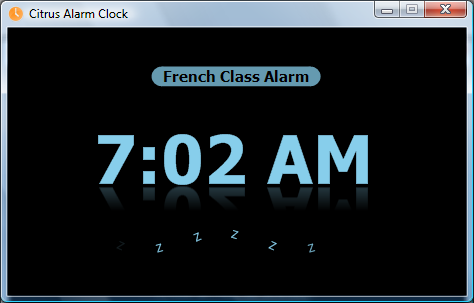
Each alarm can have its own time and can use individual tracks or a custom playlist. Citrus supports MP3, WMA, and other media types, so a morning alarm can draw on existing audio files. Playback fades in gradually instead of starting at full volume, while the program adjusts system volume to a suitable level for the alarm. An animated display shows the alarm time while the clock is in use.
For computers left in low-power sleep overnight, Citrus can wake the system shortly before an alarm is due. Snooze controls allow an alarm to be delayed: the space bar can be used at the computer, or a middle-button click on a wireless mouse can trigger snooze from a bedside position. A skip-alarm option provides a way to omit an occurrence, such as on a holiday, without having to change the regular schedule.
The combination of separate schedules, playlists, and snooze controls suits people whose routines vary from day to day or who prefer waking to selected music. It can also be used as a simple daily reminder to start the day at a set time. Users can choose a different playlist for different mornings, retain recurring alarm times, and skip individual alarms when the usual routine does not apply.
Citrus Alarm Clock is trialware from Orangeline Interactive. It is available for Windows, including Windows 10 and Windows 11, and its interface is offered in English, Russian, Spanish, French, Norwegian, Hebrew, Traditional Chinese, Simplified Chinese, and Croatian. Music playback depends on having compatible audio files available on the computer; the program is intended for use as a desktop alarm rather than a standalone clock device.