ComboTIFF for Windows 10 - Full description
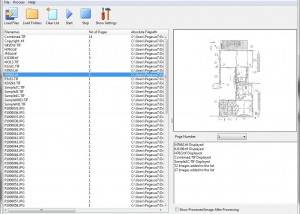
ComboTIFF is a batch imaging application for assembling image files into multi-page TIFF documents and separating those documents into individual images. It is suited to offices and other users who store or process scanned paperwork, as well as anyone who needs to combine TIFF, JPEG, and PNG files in a single document. A multi-page TIFF keeps related pages together in one file, which can make document sets easier to store and handle than separate image files.
To create a multi-page TIFF, ComboTIFF combines selected TIFF, JPG, and PNG images. This is useful for grouping the pages of a scanned document or bringing together related images before archiving or sharing them. The resulting file can include black-and-white, grayscale, and color images, so pages with different image types can be kept in the same document. TIFF compression options include JPEG, LZW, Packbits, CCITT G3, and CCITT G4, giving users a choice of supported compression methods when creating files.
The extraction function separates a multi-page TIFF into single-page files. Pages can be saved as TIFF, JPEG, or PNG, allowing the output format to match the next step in a workflow, such as retaining TIFF images or preparing JPEG or PNG copies. This can also help when only selected pages need to be handled individually. ComboTIFF provides image resizing by ratio, percentage, or pixel dimensions, which can be used to adjust images during batch processing rather than resizing each file separately.
These tools support practical document tasks such as consolidating scanned records, keeping related pages in one file, and splitting an archive document for editing or reuse. A multi-page TIFF can also be opened in applications that support the format; for example, Preview on macOS can select pages for printing or PDF conversion. ComboTIFF itself focuses on creating, extracting, resizing, and converting image files rather than serving as a general document editor.
ComboTIFF is trialware and supports Windows 10 and Windows 11, as well as earlier Windows releases. Its input and output options cover TIFF, JPG/JPEG, and PNG images, with TIFF compression choices available when creating multi-page files. The application is intended for batch image handling, so users can process groups of pages as part of a document workflow instead of managing every image as a separate task.