Icecream Slideshow Maker
Welcome to the home of Icecream Slideshow Maker, an innovative software developed by Icecream Apps. ... software is a game-changer in the realm of slideshow creation. With its user-friendly interface and robust features, ...

DVD slideshow GUI turns photos and other media into animated presentations for DVD, video and web playback. It offers 245 transitions, 100 effects, motion backgrounds, pan, zoom and rotation controls, plus tools for music, subtitles and borders. Projects can include AVI or Avisynth clips and PowerPoint or Impress files. Export options include DVD ISO images, folders, AVI, Flash video, HD formats, storyboards and chapter files.
| Author: | Tin2tin |
| License: | Freeware |
| Price: | FREE |
| Released: | Jan 15, 2013 |
| File size: | 25.70 MB |
| Downloads: | 320 |
| Keywords: | slide, multimedia editing, slideshow transitions, Windows 10 software, dvd slideshow creator, Tin2tin, slideshow video exporter, animation, DVD Slideshow GUI, slideshow, animated picture slideshow, photo slideshow, photo presentation software, slideshow builder, x64 application, photo slideshow creation, picture slideshow, photo slideshow maker |
| Author URL: | http://download.videohelp.com/tin2tin/links.html |
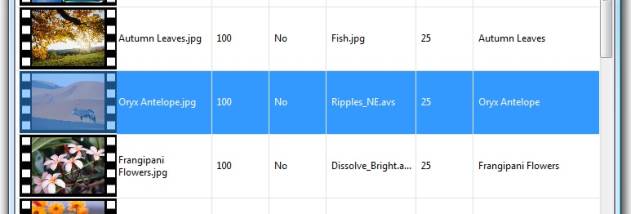

DVD slideshow GUI is a Windows application for turning photos and other media into a timed slideshow, with tools for arranging, animating and presenting images. It is suited to users who want to make a DVD slideshow or produce a video and related files from a collection of pictures. The project can combine still images, video clips, presentations and audio, then export the result in formats for disc authoring, playback or web use.
A timeline-based workflow lets users add images and set their order, then apply transitions and effects to shape how one slide gives way to the next. The program includes 245 transitions and 100 effects that can be applied across a slideshow. Images can be animated with zoom, pan and rotation, including overlapping pictures and photos with alpha-channel transparency. Motion backgrounds, borders and subtitles can also be added, while music can be assembled and edited alongside the visuals.
For projects intended for television or DVD, output options cover PAL and NTSC in both 4:3 and 16:9 aspect ratios. DVD-related exports include an authored ISO image or DVD folder structure, as well as video, audio, subtitle and chapter files for further authoring or playback. Other output choices include AVI, Flash video, an Avisynth script, storyboards in HTML, and single images with backgrounds. The program can also prepare video for YouTube and export Blu-ray or HD formats such as 720p and 1080p.
The workflow can include more than photographs: DVD slideshow GUI accepts AVI and Avisynth video, PowerPoint presentations and OpenDocument Impress files. Subtitle support includes SRT and SSA, and chapter information can be saved as SMPTE timecodes or frame numbers. Users can create their own transitions, effects and motion backgrounds, providing more control over a project's visual style than a fixed set of templates alone. These options suit family photo presentations, event recaps, and projects that need both a disc-ready version and separate media files.
DVD slideshow GUI is freeware and supports Windows versions through Windows 10, including 64-bit editions where listed. Its DVD presets are intended for standard PAL or NTSC television formats, while the additional video exports cover other viewing needs. The interface is available in multiple languages, including English, French, German, Spanish, Japanese and Chinese. Export choices can produce an authored disc image, files for another authoring tool, or video and supporting assets for use elsewhere.