Standard Codecs for Windows 7 and 8 64-bit
Standard Codecs is a free codec collection for Windows that adds support for a ... OGG without searching for and installing a separate codec for each format. The collection also connects supported ...

Shark007 Codecs (Standard Edition) is a freeware codec pack for Windows that adds media playback components and configuration tools. It includes LAV video decoder and audio splitter settings, format selection, subtitle and Icaros thumbnail controls, plus audio options for format support, dynamic range and mixing. Utilities include a Windows Media Player library rebuilder and a file associations remover. The edition has been deprecated and replaced by Shark007 Codecs.
| Author: | Shark007 |
| License: | Freeware |
| Price: | FREE |
| Released: | Oct 29, 2026 |
| File size: | 25.50 MB |
| Downloads: | 226 |
| Keywords: | Multimedia, Codec Pack, media playback codecs, download Shark007 Codecs (Standard Edition), video codec pack, Viewer, Shark007 Codecs Standard Edition, video codecs, Shark007 Codecs (Standard Edition) free download, codec pack, Video Codec, Player, Standard Codecs, media codec installer, Shark007 Codecs (Standard Edition), lav video decoder, Codec, audio splitter |
| Author URL: | https://shark007.net/ |
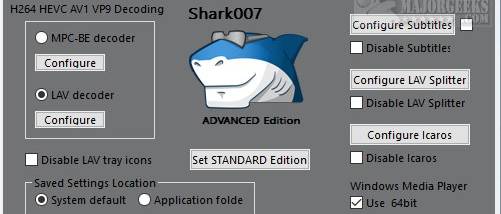


Shark007 Codecs (Standard Edition) is a freeware codec pack for Windows users who need additional format support and controls for multimedia playback. It installs a selection of playback components and provides configuration tools for users troubleshooting files that do not play correctly or adjusting how audio and video are handled. The Standard Edition focuses on essential components while still exposing settings for more experienced users. It has been deprecated and replaced by the newer Shark007 Codecs package.
The configuration interface includes LAV video decoder and audio splitter settings. Users can review the formats these components decode or demultiplex and change which formats are enabled, which can help when a particular file is not being handled as expected. The default settings are intended to suit common playback needs, while descriptions of some options help explain their purpose before they are changed. Subtitle handling and Icaros thumbnail settings are also available through the Configure menu.
Separate Audio and AVI/WMV menus provide controls for other playback-related behavior. The audio options cover format support, dynamic range and mixing, allowing users to inspect how the system processes sound and adjust relevant settings. The pack also includes miscellaneous utilities, including a Windows Media Player library rebuilder and a tool for removing file associations. These controls make the program useful not only for installing codec support, but also for addressing configuration issues around media files and players.
Typical uses include resolving missing-format problems, changing decoder or splitter behavior, managing subtitle and thumbnail options, and investigating audio playback settings. Users who simply need playback support can generally leave the default configuration in place; those diagnosing a specific issue can use the format lists and related menus to check how the file type is treated. The included tools also offer a way to rebuild a Windows Media Player library or clear file associations when needed.
The Standard Edition is freeware and is intended for 64-bit Windows 10 and Windows 11. Because this edition has been discontinued in favor of Shark007 Codecs, users seeking the current product should look for that replacement. Settings affect media components and playback behavior, so changes are most useful when made to address a specific format or system configuration issue.