ExamDiff Pro
ExamDiff Pro is a Windows file and directory comparison ... corresponding material can be examined together. For text comparisons, ExamDiff Pro highlights additions, deletions, and modifications with color ...

ExamDiff is a Windows utility for visually comparing two files in side-by-side panes. It marks differences and provides buttons, shortcuts and a drop-down list for moving between them. Users can adjust comparison rules to ignore case or whitespace, search pane contents, and re-compare files after changes. Drag-and-drop file selection, recent-pair history, copying between panes and saving results as a UNIX DIFF file support everyday review workflows. A configurable external editor can open either file.
| Author: | PrestoSoft LLC |
| License: | Freeware |
| Price: | FREE |
| Released: | Mar 29, 2024 |
| File size: | 532 kB |
| Downloads: | 261 |
| Keywords: | Windows 10 compatibility, compare source code files, PrestoSoft LLC software, ExamDiff review, file comparison tool, side by side file comparer, code differentiation software, comparer, visual file diff, unix diff export, compare text files, Compare dialog, compare, file comparer, comparison, x64 application, comparison tool |
| Author URL: | https://www.prestosoft.com/ |
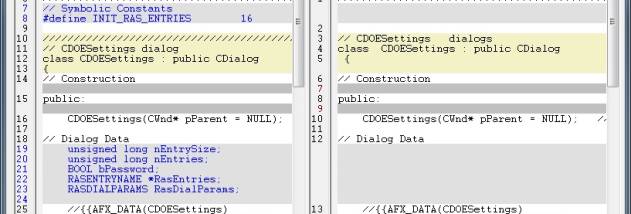

ExamDiff is a visual file comparison utility for Windows, intended for developers, editors and anyone who needs to inspect changes between two text files. It opens the files in side-by-side panes and marks differences so users can review edits without relying on a line-by-line scan. The interface also supports comparing a file against another file selected by entering its directory, which can save time when working with files in separate folders.
Navigation tools make it practical to move through a comparison of any size. Previous Difference and Next Difference controls, keyboard shortcuts and a drop-down list jump between detected changes; a current-difference marker identifies the active location. The panes scroll in sync, helping users see corresponding sections together. When a file changes during a session, ExamDiff can detect the update and prompt for a fresh comparison. Its re-compare command attempts to retain the viewer's position, making repeated checks easier to follow.
Comparison settings can be adjusted to focus on meaningful edits. Options include ignoring case, leading or trailing spaces, and differences in the amount of whitespace; users can also treat files as text and choose to show differences only. Text and background colors, fonts, tab size and pane orientation are customizable. Search locates strings in either comparison pane and retains recent queries, while file extension filters can restrict which file types are shown. File pairs can be selected by dragging one or two files into the window, or chosen from a history of recent comparisons. An autopick option remembers matching pairs in the Compare dialog.
ExamDiff supports practical follow-up tasks as well as review. Users can copy text between panes by dragging it, using a keyboard shortcut or opening the context menu. Differences can be saved as a standard UNIX DIFF file for use in other tools or workflows. A configurable external editor can open either compared file, with optional line-position variables for editors that support them. These features make the utility useful for checking source-code edits, reviewing text documents, and confirming changes between saved versions.
ExamDiff is freeware. It is a standalone visual comparison tool and is also part of a broader PrestoSoft product suite that includes FtpVC, an FTP-based version-control system for remote collaborative development. Its command-line interface can launch comparisons with two filenames and options, while the graphical interface provides file selection, display controls and comparison navigation. The utility is designed around comparing files rather than managing an entire project or replacing a version-control system.